
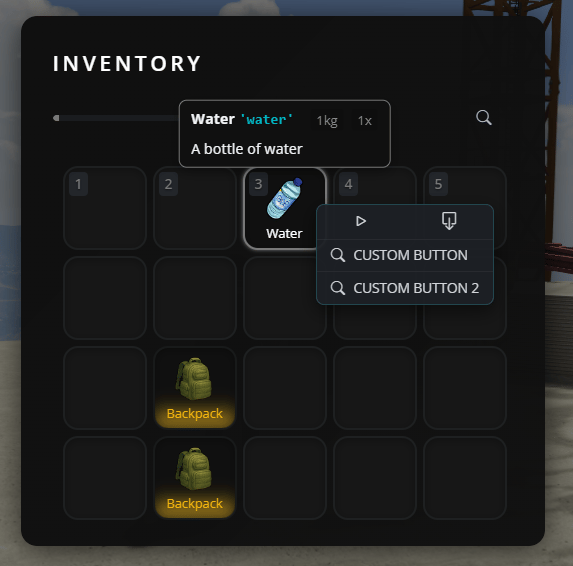
When to use each method
Single item
Use when you want buttons for ONE specific item (e.g., only on “water” item)
By type
Use when you want the same buttons on ALL items of the same type (e.g., all weapons, all containers)
Method 1: Adding buttons to a single item
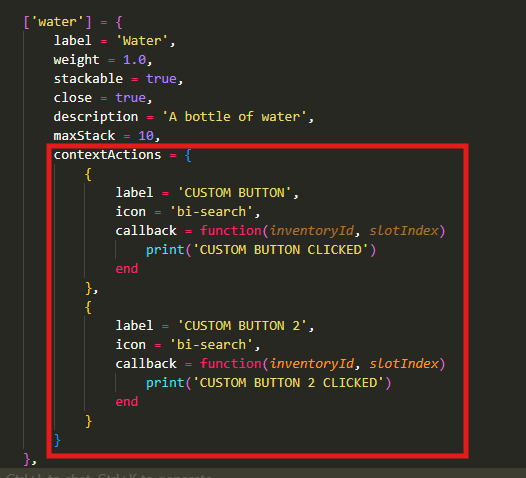
To add custom buttons to a single specific item, openjaksam_inventory/_data/items.lua and find or create your item. Add the contextActions property:
Important notes:
inventoryId: Identifies which inventory the item is in (player inventory, vehicle trunk, etc.)slotIndex: The slot number where the item is locatedicon: Use Bootstrap Icons (search “bootstrap icons” online to find icon names)
Method 2: Adding buttons to all items of a specific type
If you want the same buttons to appear on ALL items of the same type (like all weapons, all food items, etc.), use the defaults system. Openjaksam_inventory/_data/defaults.lua and add or modify the type you want:
- ALL items with
type = 'weapon'will have “Empty ammo” and “View components” buttons - ALL items with
type = 'food'will have an “Eat” button
Adding global buttons to ALL items
You can also add buttons that appear on EVERY item in the game using the special['*'] key: