> ## Documentation Index
> Fetch the complete documentation index at: https://docs.jaksam-scripts.com/llms.txt
> Use this file to discover all available pages before exploring further.
# Fix hotwiring bought car
> Refresh a player's owned vehicles after a purchase so they don't have to hotwire it, for common vehicle shop scripts.
## Generic script
If you have to hotwire a vehicle right after purchasing it, add [this simple line of code](/vehicles-keys/client/refresh-self-owned-vehicles) to your script, after the vehicle has been added to the `owned_vehicles` / `player_vehicles` table (depending on the framework).
You may want to add a `Citizen.Wait(2000)` before that line, in case the vehicle wasn't yet in the table at the moment you triggered the event.
## esx\_vehicleshop
### First step
Go to `esx_vehicleshop/server/main.lua` and search for the following code:
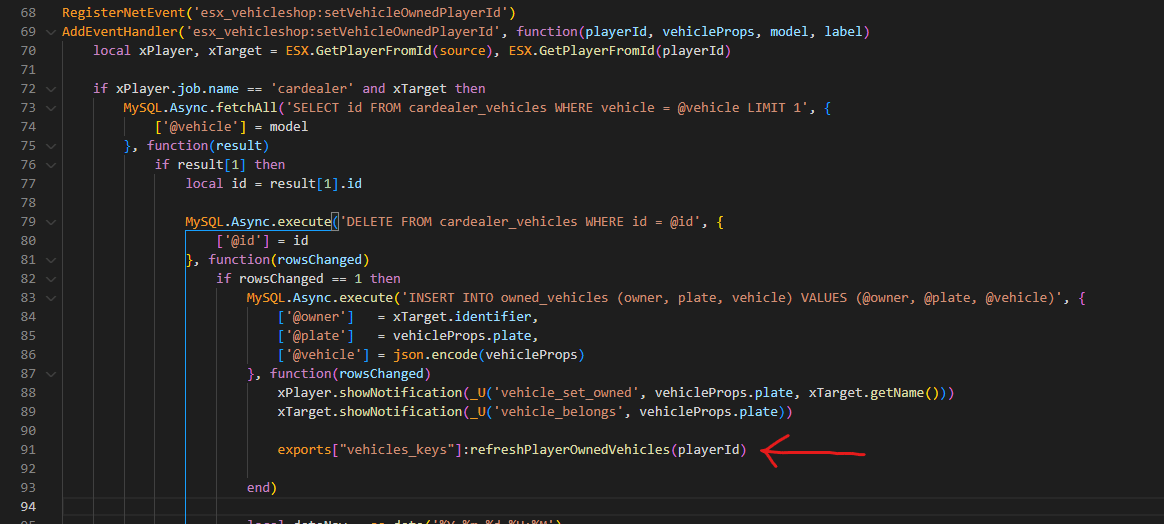
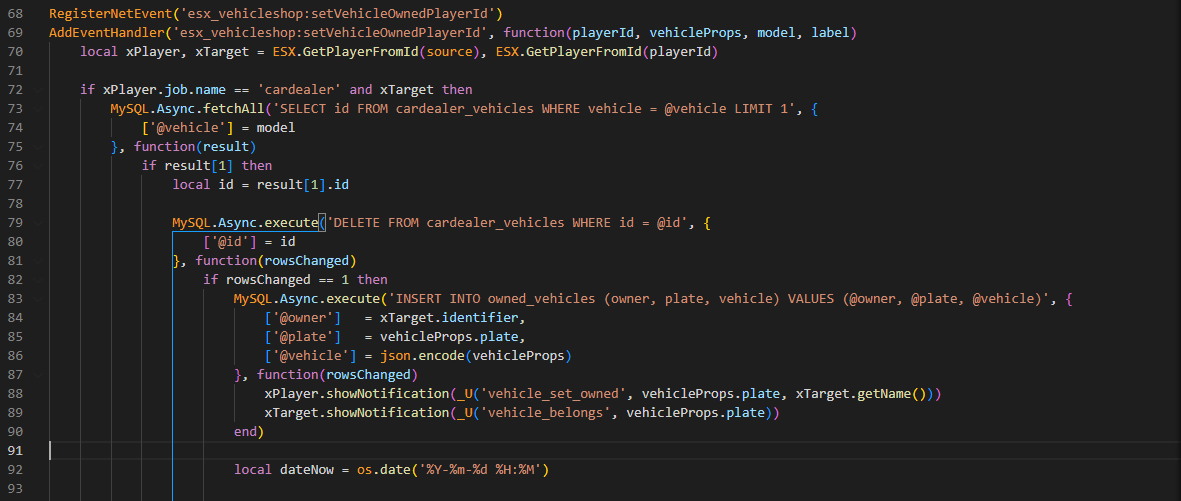 And add this line:
```lua theme={null}
exports["vehicles_keys"]:refreshPlayerOwnedVehicles(playerId)
```
And add this line:
```lua theme={null}
exports["vehicles_keys"]:refreshPlayerOwnedVehicles(playerId)
```
 ### Second step
Go to `esx_vehicleshop/server/main.lua` (the same file as before) and search for the following code:
### Second step
Go to `esx_vehicleshop/server/main.lua` (the same file as before) and search for the following code:
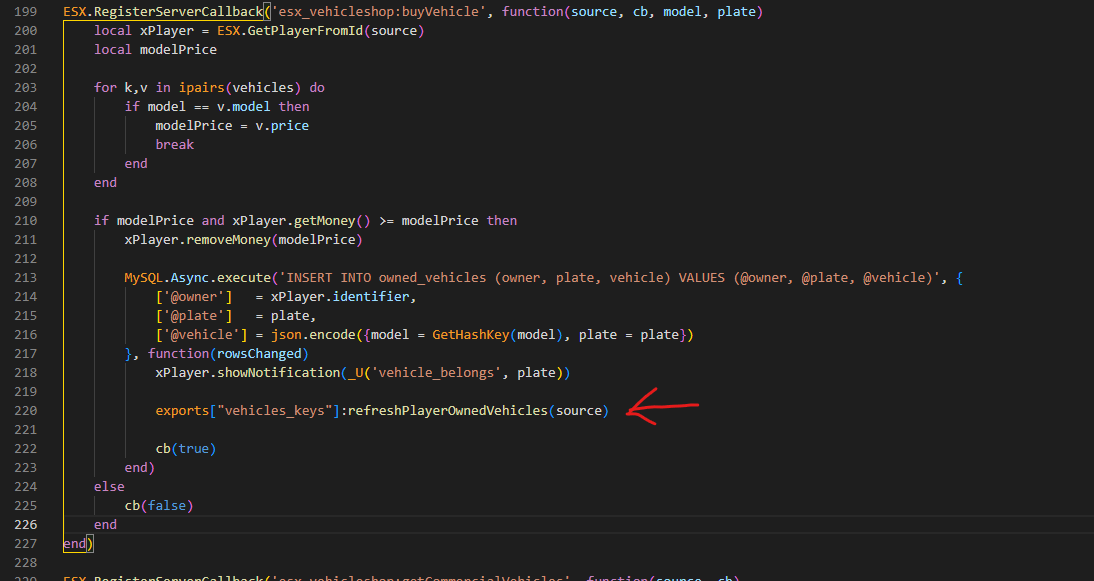
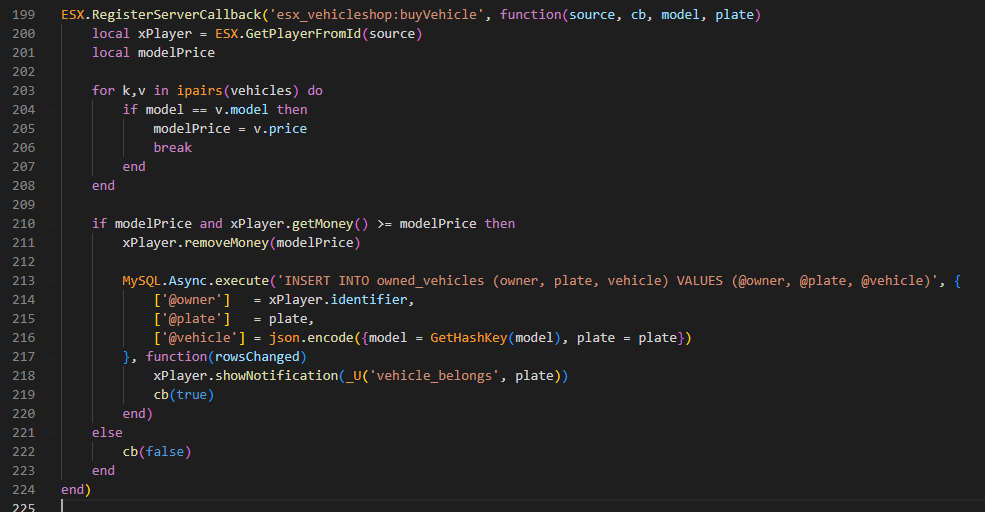 And add this line:
```lua theme={null}
exports["vehicles_keys"]:refreshPlayerOwnedVehicles(source)
```
And add this line:
```lua theme={null}
exports["vehicles_keys"]:refreshPlayerOwnedVehicles(source)
```
 ## esx\_advancedvehicleshop
Go to `esx_advancedvehicleshop/server/main.lua` and search for the following code:
## esx\_advancedvehicleshop
Go to `esx_advancedvehicleshop/server/main.lua` and search for the following code:
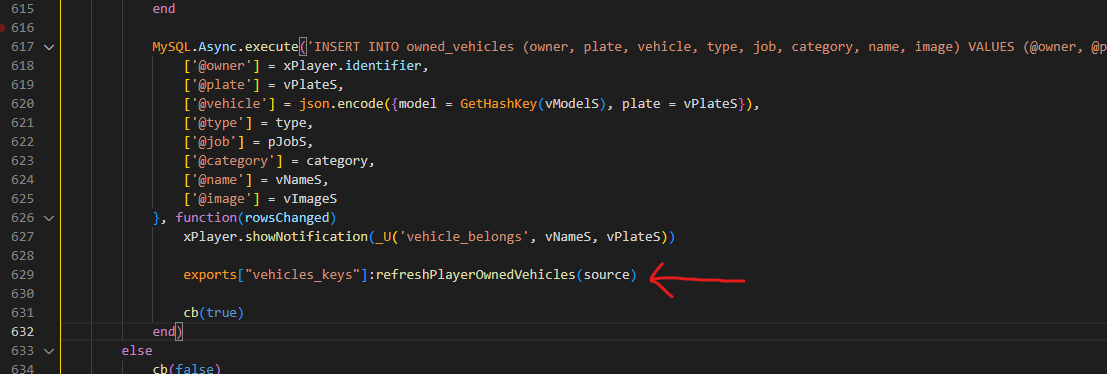
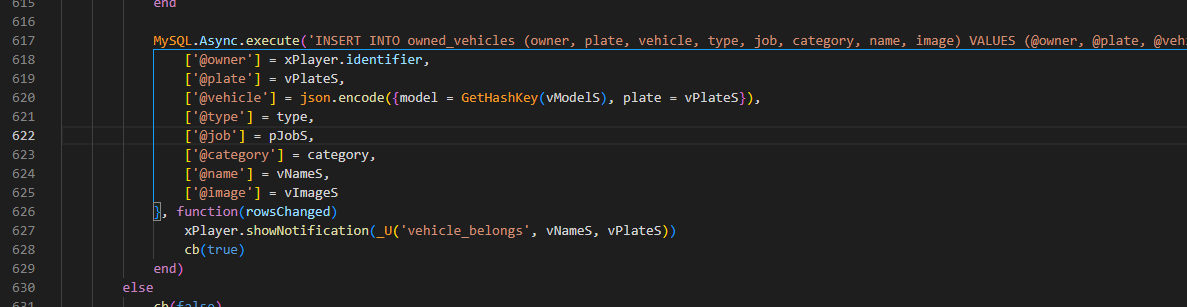 And add this line:
```lua theme={null}
exports["vehicles_keys"]:refreshPlayerOwnedVehicles(source)
```
And add this line:
```lua theme={null}
exports["vehicles_keys"]:refreshPlayerOwnedVehicles(source)
```
 ## qb-vehicleshop
### First step
Go to `qb-vehicleshop/server.lua` and add the following code after **all** `exports.oxmysql:insert` calls.
In the example it's shown only once, but you have to add it multiple times.
## qb-vehicleshop
### First step
Go to `qb-vehicleshop/server.lua` and add the following code after **all** `exports.oxmysql:insert` calls.
In the example it's shown only once, but you have to add it multiple times.
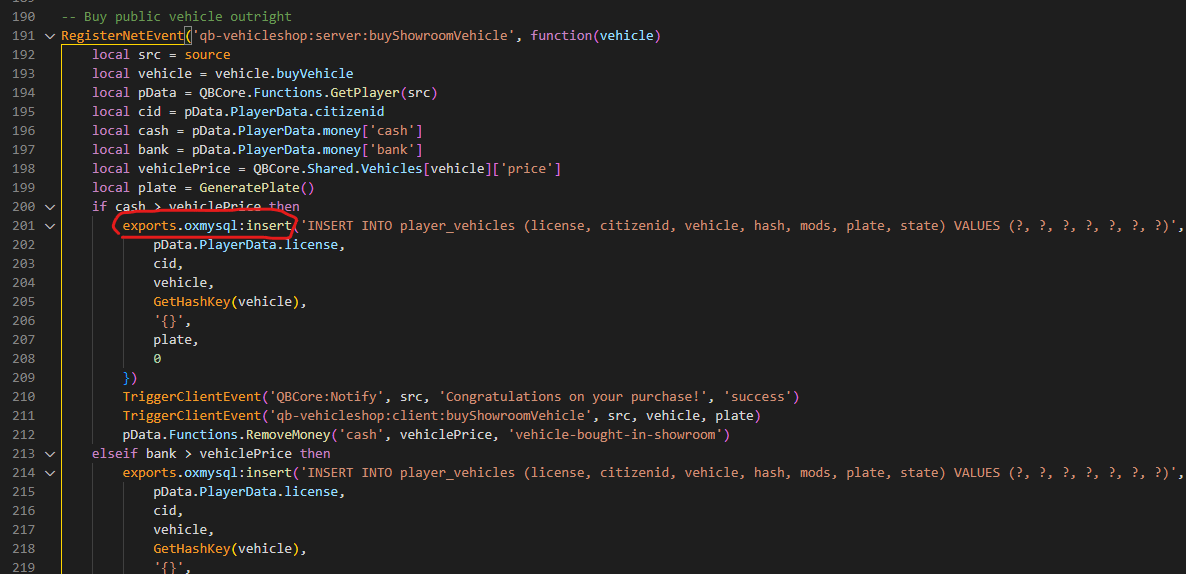 Add the following code:
```lua theme={null}
SetTimeout(1000, function()
exports["vehicles_keys"]:refreshPlayerOwnedVehicles( pData.PlayerData.source )
end)
```
In certain parts, you'll have to replace `pData` with something else. Here it shows where to add the code and what `pData` depends on.
Add the following code:
```lua theme={null}
SetTimeout(1000, function()
exports["vehicles_keys"]:refreshPlayerOwnedVehicles( pData.PlayerData.source )
end)
```
In certain parts, you'll have to replace `pData` with something else. Here it shows where to add the code and what `pData` depends on.
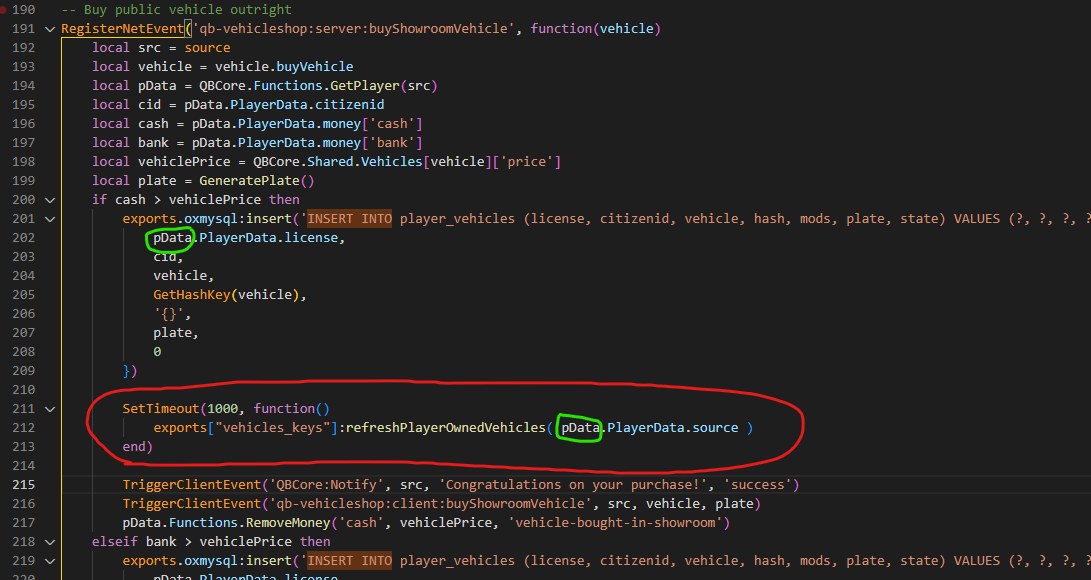 The green circles shown in the screenshot must match — so if the first one is, for example, `targetPlayer`, the second one must be `targetPlayer` as well.
### Second step
Go to `qb-vehicleshop/server.lua` (the same file as before) and replace all these events (they're at the bottom of the file):
```lua theme={null}
TriggerClientEvent('vehiclekeys:client:SetOwner', buyerId, plate)
```
with the following code:
```lua theme={null}
exports["vehicles_keys"]:refreshPlayerOwnedVehicles(buyerId)
```
## okokVehicleShop
Go to `okokVehicleShop/sv_utils.lua` and search for the following code:
The green circles shown in the screenshot must match — so if the first one is, for example, `targetPlayer`, the second one must be `targetPlayer` as well.
### Second step
Go to `qb-vehicleshop/server.lua` (the same file as before) and replace all these events (they're at the bottom of the file):
```lua theme={null}
TriggerClientEvent('vehiclekeys:client:SetOwner', buyerId, plate)
```
with the following code:
```lua theme={null}
exports["vehicles_keys"]:refreshPlayerOwnedVehicles(buyerId)
```
## okokVehicleShop
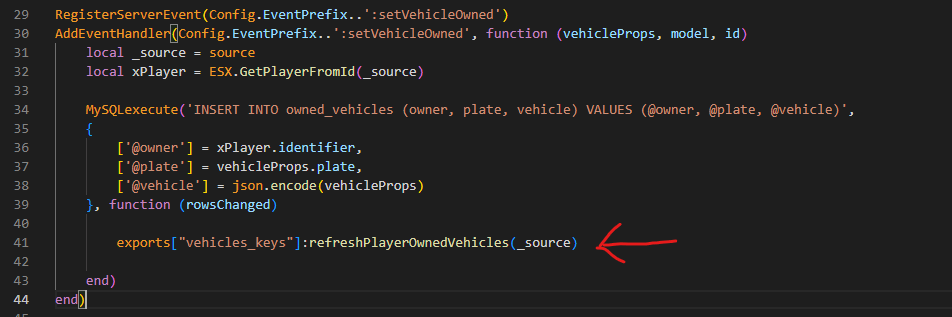
Go to `okokVehicleShop/sv_utils.lua` and search for the following code:
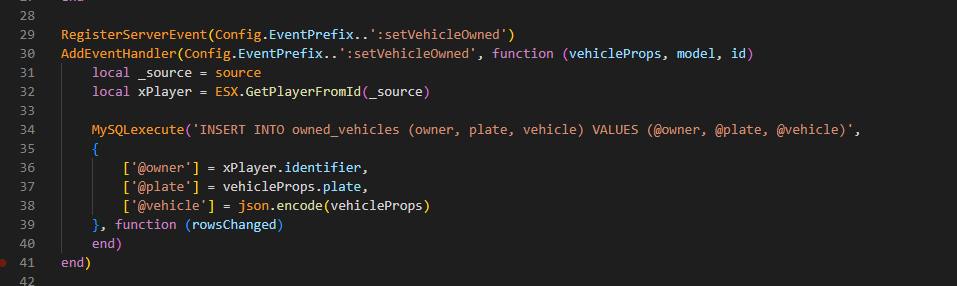 And add this line:
```lua theme={null}
exports["vehicles_keys"]:refreshPlayerOwnedVehicles(_source)
```
And add this line:
```lua theme={null}
exports["vehicles_keys"]:refreshPlayerOwnedVehicles(_source)
```
 ## s4-vehicleshop
Go to `s4-vehicleshop/server.lua` and search for the following code:
## s4-vehicleshop
Go to `s4-vehicleshop/server.lua` and search for the following code:
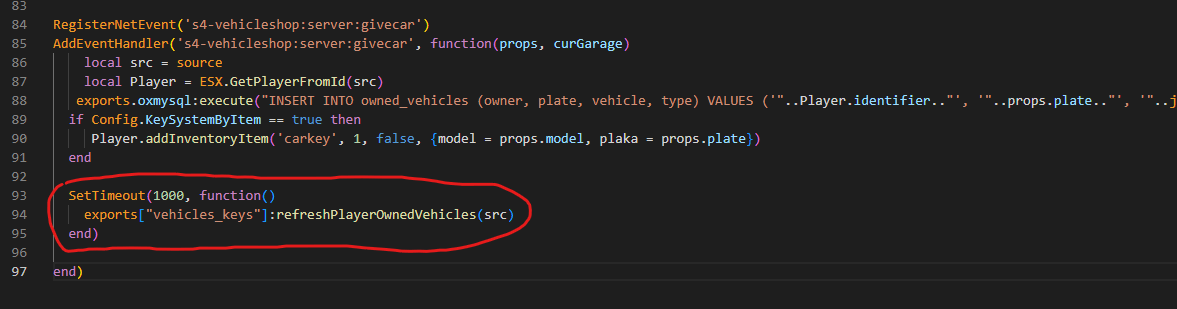
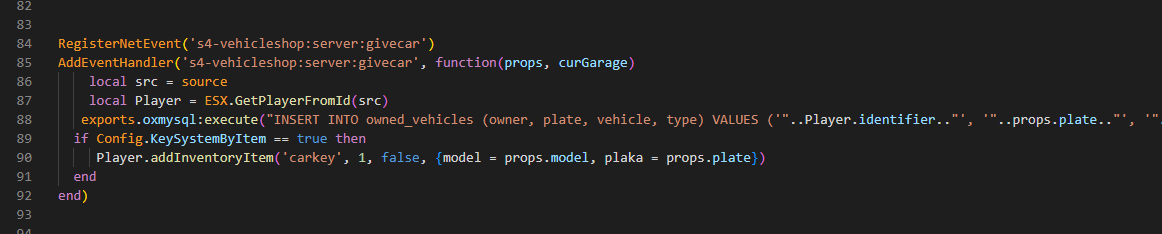 And add the following code:
```lua theme={null}
SetTimeout(1000, function()
exports["vehicles_keys"]:refreshPlayerOwnedVehicles(src)
end)
```
And add the following code:
```lua theme={null}
SetTimeout(1000, function()
exports["vehicles_keys"]:refreshPlayerOwnedVehicles(src)
end)
```
 This code works for both *oxmysql* and *ghmattimysql* versions.
## t1ger\_dealerships
### First step
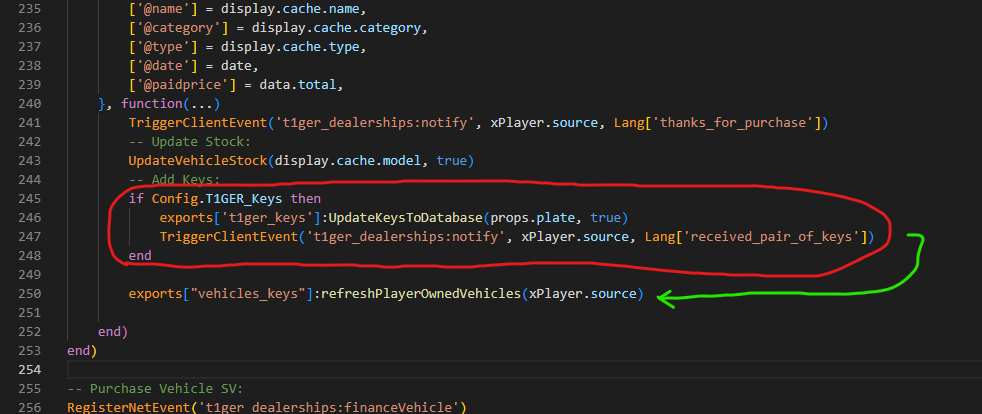
Go to `t1ger_dealerships/server/main.lua` and add the following line below **all** occurrences (more than one) of the code shown in the example:
```lua theme={null}
exports['t1ger_keys']:UpdateKeysToDatabase(props.plate, true)
```
This code works for both *oxmysql* and *ghmattimysql* versions.
## t1ger\_dealerships
### First step
Go to `t1ger_dealerships/server/main.lua` and add the following line below **all** occurrences (more than one) of the code shown in the example:
```lua theme={null}
exports['t1ger_keys']:UpdateKeysToDatabase(props.plate, true)
```
 Add the following line:
```lua theme={null}
exports["vehicles_keys"]:refreshPlayerOwnedVehicles(xPlayer.source)
```
Add the following line:
```lua theme={null}
exports["vehicles_keys"]:refreshPlayerOwnedVehicles(xPlayer.source)
```
 ### Second step
Go to `t1ger_dealerships/server/main.lua` (the same file as before) and search for the following code:
### Second step
Go to `t1ger_dealerships/server/main.lua` (the same file as before) and search for the following code:
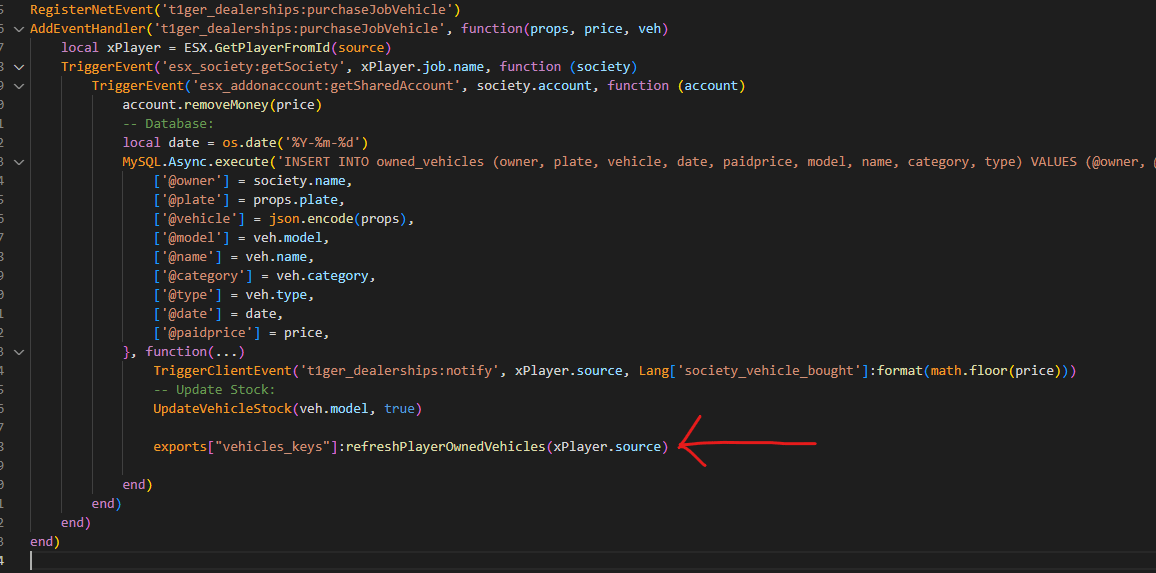
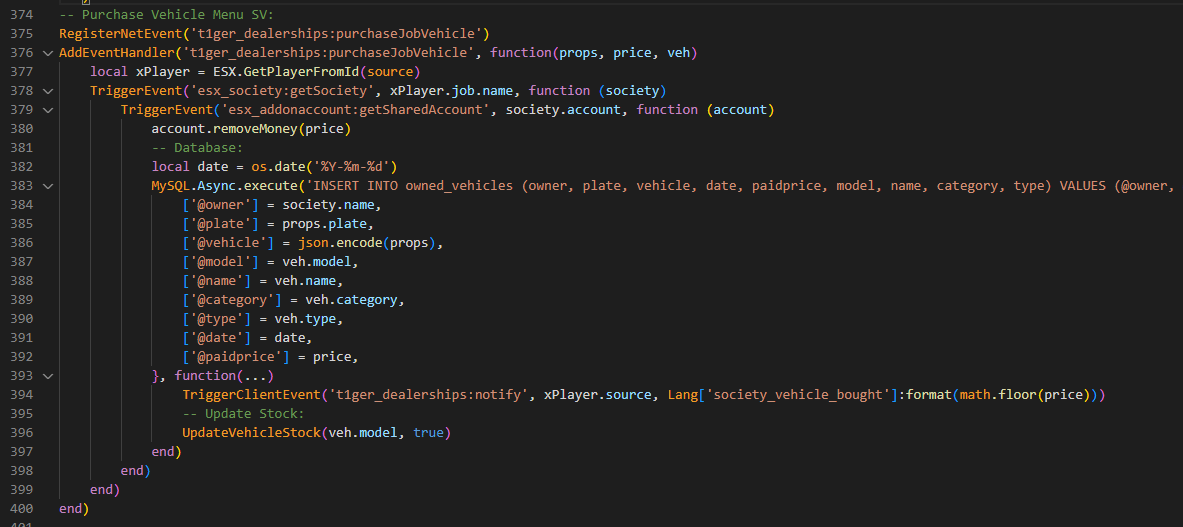 Add the following line:
```lua theme={null}
exports["vehicles_keys"]:refreshPlayerOwnedVehicles(xPlayer.source)
```
Add the following line:
```lua theme={null}
exports["vehicles_keys"]:refreshPlayerOwnedVehicles(xPlayer.source)
```
 ## Related topics
- [FAQ](/vehicles-keys/faq.md)
- [Toggle hotwiring](/vehicles-keys/client/toggle-hotwiring.md)
- [Vehicles Keys](/vehicles-keys/home.md)
- [Shop bought](/shops-creator/server/shop-bought.md)
- [Item bought](/jobs-creator/server/shop/item-bought.md)
## Related topics
- [FAQ](/vehicles-keys/faq.md)
- [Toggle hotwiring](/vehicles-keys/client/toggle-hotwiring.md)
- [Vehicles Keys](/vehicles-keys/home.md)
- [Shop bought](/shops-creator/server/shop-bought.md)
- [Item bought](/jobs-creator/server/shop/item-bought.md)