> ## Documentation Index
> Fetch the complete documentation index at: https://docs.jaksam-scripts.com/llms.txt
> Use this file to discover all available pages before exploring further.
# Installation
> Install Robberies Creator on your FiveM server with ESX, QBCore, or OX Inventory, including optional minigame scripts and default items setup.
The installation of the script is extremely easy.
## Requirements
* **ESX**, **QBCore**, or **OX Inventory**
* The [cracking safe script](https://github.com/VHall1/pd-safe) by [VHall1](https://github.com/VHall1)
* The [lockpicking script](https://github.com/baguscodestudio/lockpick) by [baguscodestudio](https://github.com/baguscodestudio/lockpick)
* Optional minigame scripts (see below) if you want to use them
Do **NOT** use FileZilla to upload the files, otherwise the script will **NOT** work.
Use [WinSCP](https://winscp.net/eng/download.php) instead.
Download the script and extract it in your resources.
Add the script in your auto start (example: `server.cfg`).
The script will **automatically** set up the database. In case it doesn't, you can manually run the files in the `robberies_creator/sql/` folder.
Download and start the [cracking safe script](https://github.com/VHall1/pd-safe) *(credits to [VHall1](https://github.com/VHall1))*.
Download and start the [lockpicking script](https://github.com/baguscodestudio/lockpick) *(credits to [baguscodestudio](https://github.com/baguscodestudio/lockpick))*.
* Download and start the [datacrack minigame script](https://github.com/utkuali/datacrack) *(credits to [utkuali](https://github.com/utkuali))*
* Download and start the [fingerprint minigame script](https://github.com/utkuali/Finger-Print-Hacking-Game) *(credits to [utkuali](https://github.com/utkuali))*
* Download and start the [memory minigame script](https://github.com/ultrahacx/ultra-keypackhack) *(credits to [ultrahacx](https://github.com/ultrahacx))*
### Adding the items — Optional
To add the premade items, you only have to run the file `robberies_creator/sql/items_limit.sql` **or** `robberies_creator/sql/items_weight.sql`, depending on whether your server uses limit or weight.
The latest version of ESX uses **weight**.
If it doesn't work, be sure to use the latest official version of ESX with the required dependencies.
Download the script and extract it in your resources.
Add the script in your auto start (example: `server.cfg`).
The script will **automatically** set up the database. In case it doesn't, you can manually run the files in the `robberies_creator/sql/` folder.
Download and start the [cracking safe script](https://github.com/VHall1/pd-safe) *(credits to [VHall1](https://github.com/VHall1))*.
Download and start the [lockpicking script](https://github.com/baguscodestudio/lockpick) *(credits to [baguscodestudio](https://github.com/baguscodestudio/lockpick))*.
* Download and start the [datacrack minigame script](https://github.com/utkuali/datacrack) *(credits to [utkuali](https://github.com/utkuali))*
* Download and start the [fingerprint minigame script](https://github.com/utkuali/Finger-Print-Hacking-Game) *(credits to [utkuali](https://github.com/utkuali))*
* Download and start the [memory minigame script](https://github.com/ultrahacx/ultra-keypackhack) *(credits to [ultrahacx](https://github.com/ultrahacx))*
### Adding the items — Optional
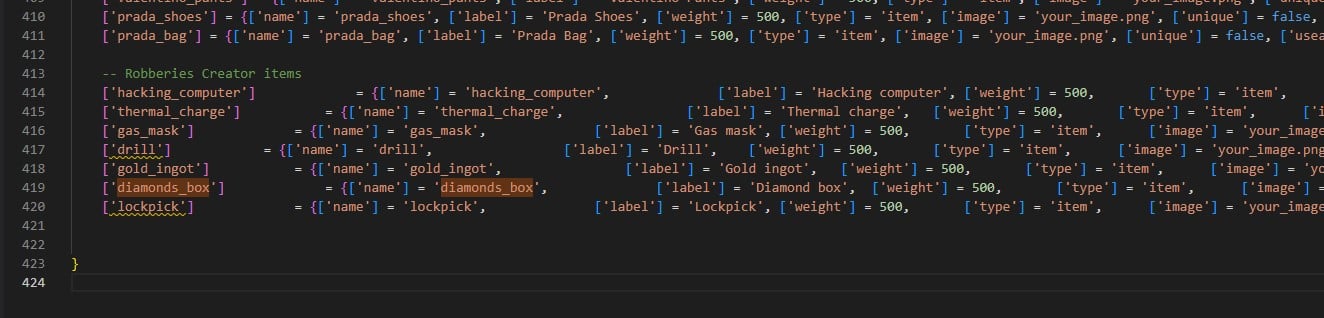
To add the new items, edit the `qb-core/shared/items.lua` file and add the following code at the bottom of the table:
```lua theme={null}
-- Robberies Creator items
['hacking_computer'] = {['name'] = 'hacking_computer', ['label'] = 'Hacking computer', ['weight'] = 500, ['type'] = 'item', ['image'] = 'your_image.png', ['unique'] = false, ['useable'] = true, ['shouldClose'] = true, ['combinable'] = nil, ['description'] = 'Computer to hack panels'},
['thermal_charge'] = {['name'] = 'thermal_charge', ['label'] = 'Thermal charge', ['weight'] = 500, ['type'] = 'item', ['image'] = 'your_image.png', ['unique'] = false, ['useable'] = true, ['shouldClose'] = true, ['combinable'] = nil, ['description'] = 'Use to melt some doors'},
['gas_mask'] = {['name'] = 'gas_mask', ['label'] = 'Gas mask', ['weight'] = 500, ['type'] = 'item', ['image'] = 'your_image.png', ['unique'] = false, ['useable'] = true, ['shouldClose'] = true, ['combinable'] = nil, ['description'] = 'Protects from lethal gas'},
['drill'] = {['name'] = 'drill', ['label'] = 'Drill', ['weight'] = 500, ['type'] = 'item', ['image'] = 'your_image.png', ['unique'] = false, ['useable'] = true, ['shouldClose'] = true, ['combinable'] = nil, ['description'] = 'Can be used to open trucks doors'},
['gold_ingot'] = {['name'] = 'gold_ingot', ['label'] = 'Gold ingot', ['weight'] = 500, ['type'] = 'item', ['image'] = 'your_image.png', ['unique'] = false, ['useable'] = true, ['shouldClose'] = true, ['combinable'] = nil, ['description'] = 'Goooold'},
['diamonds_box'] = {['name'] = 'diamonds_box', ['label'] = 'Diamond box', ['weight'] = 500, ['type'] = 'item', ['image'] = 'your_image.png', ['unique'] = false, ['useable'] = true, ['shouldClose'] = true, ['combinable'] = nil, ['description'] = 'Diamooonds'},
['lockpick'] = {['name'] = 'lockpick', ['label'] = 'Lockpick', ['weight'] = 500, ['type'] = 'item', ['image'] = 'your_image.png', ['unique'] = false, ['useable'] = true, ['shouldClose'] = true, ['combinable'] = nil, ['description'] = 'Used to lockpick doors'},
['painting'] = {['name'] = 'painting', ['label'] = 'Painting', ['weight'] = 500, ['type'] = 'item', ['image'] = 'your_image.png', ['unique'] = false, ['useable'] = true, ['shouldClose'] = true, ['combinable'] = nil, ['description'] = 'Expensive painting'},
```
 Here's a list of items to use with OX Inventory. You can even use it with jaksam's inventory, in the "import from code" setting.
```lua theme={null}
['hacking_computer'] = {
label = 'Hacking computer',
weight = 500,
stack = true,
close = true,
description = 'Computer to hack panels'
},
['thermal_charge'] = {
label = 'Thermal charge',
weight = 500,
stack = true,
close = true,
description = 'Use to melt some doors'
},
['gas_mask'] = {
label = 'Gas mask',
weight = 500,
stack = true,
close = true,
description = 'Protects from lethal gas'
},
['drill'] = {
label = 'Drill',
weight = 500,
stack = true,
close = true,
description = 'Can be used to open trucks doors'
},
['gold_ingot'] = {
label = 'Gold ingot',
weight = 500,
stack = true,
close = true,
description = 'Goooold'
},
['diamonds_box'] = {
label = 'Diamond box',
weight = 500,
stack = true,
close = true,
description = 'Diamooonds'
},
['lockpick'] = {
label = 'Lockpick',
weight = 500,
stack = true,
close = true,
description = 'Used to lockpick doors'
},
['painting'] = {
label = 'Painting',
weight = 500,
stack = true,
close = true,
description = 'Expensive painting'
},
```
You are ready to go! Enjoy the script 😁
## Verification
Open `/robberiescreator` in-game. If the menu opens, the script is running correctly.
## Optional step
After the database is set up correctly, you can delete the files in `robberies_creator/sql/` folder, so the script won't try to set up the database each time you start it.
## Related topics
- [Installation](/jaksam-inventory/installation.md)
Here's a list of items to use with OX Inventory. You can even use it with jaksam's inventory, in the "import from code" setting.
```lua theme={null}
['hacking_computer'] = {
label = 'Hacking computer',
weight = 500,
stack = true,
close = true,
description = 'Computer to hack panels'
},
['thermal_charge'] = {
label = 'Thermal charge',
weight = 500,
stack = true,
close = true,
description = 'Use to melt some doors'
},
['gas_mask'] = {
label = 'Gas mask',
weight = 500,
stack = true,
close = true,
description = 'Protects from lethal gas'
},
['drill'] = {
label = 'Drill',
weight = 500,
stack = true,
close = true,
description = 'Can be used to open trucks doors'
},
['gold_ingot'] = {
label = 'Gold ingot',
weight = 500,
stack = true,
close = true,
description = 'Goooold'
},
['diamonds_box'] = {
label = 'Diamond box',
weight = 500,
stack = true,
close = true,
description = 'Diamooonds'
},
['lockpick'] = {
label = 'Lockpick',
weight = 500,
stack = true,
close = true,
description = 'Used to lockpick doors'
},
['painting'] = {
label = 'Painting',
weight = 500,
stack = true,
close = true,
description = 'Expensive painting'
},
```
You are ready to go! Enjoy the script 😁
## Verification
Open `/robberiescreator` in-game. If the menu opens, the script is running correctly.
## Optional step
After the database is set up correctly, you can delete the files in `robberies_creator/sql/` folder, so the script won't try to set up the database each time you start it.
## Related topics
- [Installation](/jaksam-inventory/installation.md)