> ## Documentation Index
> Fetch the complete documentation index at: https://docs.jaksam-scripts.com/llms.txt
> Use this file to discover all available pages before exploring further.
# Installation
> Install Luxury Clothes Theft on your FiveM server with ESX or QBCore, including optional default items setup.
The installation of the script is extremely easy.
## Requirements
* **ESX** or **QBCore**
* On QBCore, the [`menu_default`](https://drive.google.com/file/d/1Ezz-d50NIKQZeZJ-RgyclvNG7qC4Nfu8/view?usp=sharing) script
Do **NOT** use FileZilla to upload the files, otherwise the script will **NOT** work.
Use [WinSCP](https://winscp.net/eng/download.php) instead.
Download the script and extract it in your resources.
Add the script in your auto start (example: `server.cfg`).
Configure the options in the config files (be sure to read the comments, they'll explain everything).
### Adding items — Optional
To add the premade items, you only have to run the file `luxury_clothes_theft/sql/items_limit.sql` **or** `luxury_clothes_theft/sql/items_weight.sql`, depending on whether your server uses limit or weight.
The latest version of ESX uses **weight**.
If it doesn't work, be sure to use the latest official version of ESX with the required dependencies.
Download the script and extract it in your resources.
Add the script in your auto start (example: `server.cfg`).
Configure the options in the config files (be sure to read the comments, they'll explain everything).
Download and extract the [menu\_default](https://drive.google.com/file/d/1Ezz-d50NIKQZeZJ-RgyclvNG7qC4Nfu8/view?usp=sharing) script in your resources, **without renaming it**, and add it to your auto start (example: `server.cfg`).
### Adding items
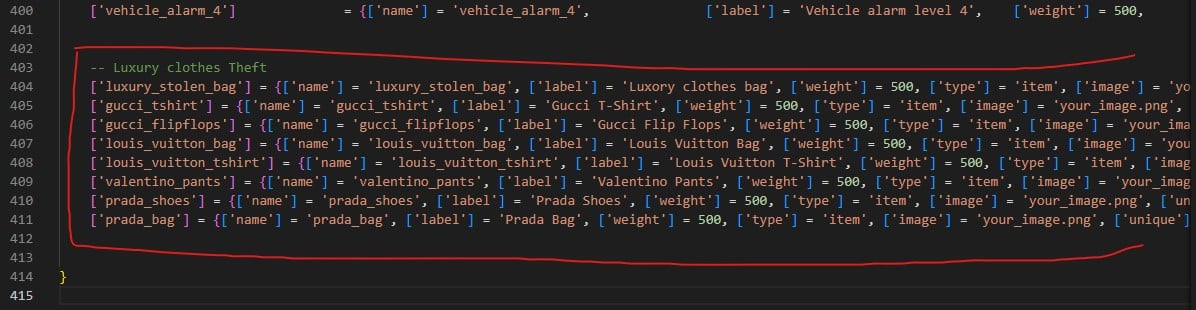
To add the new items, edit the `qb-core/shared/items.lua` file and add the following code at the bottom of the table:
```lua theme={null}
['luxury_stolen_bag'] = {['name'] = 'luxury_stolen_bag', ['label'] = 'Luxury clothes bag', ['weight'] = 500, ['type'] = 'item', ['image'] = 'your_image.png', ['unique'] = false, ['useable'] = false, ['shouldClose'] = false, ['combinable'] = nil},
['gucci_tshirt'] = {['name'] = 'gucci_tshirt', ['label'] = 'Gucci T-Shirt', ['weight'] = 500, ['type'] = 'item', ['image'] = 'your_image.png', ['unique'] = false, ['useable'] = false, ['shouldClose'] = false, ['combinable'] = nil},
['gucci_flipflops'] = {['name'] = 'gucci_flipflops', ['label'] = 'Gucci Flip Flops', ['weight'] = 500, ['type'] = 'item', ['image'] = 'your_image.png', ['unique'] = false, ['useable'] = false, ['shouldClose'] = false, ['combinable'] = nil},
['louis_vuitton_bag'] = {['name'] = 'louis_vuitton_bag', ['label'] = 'Louis Vuitton Bag', ['weight'] = 500, ['type'] = 'item', ['image'] = 'your_image.png', ['unique'] = false, ['useable'] = false, ['shouldClose'] = false, ['combinable'] = nil},
['louis_vuitton_tshirt'] = {['name'] = 'louis_vuitton_tshirt', ['label'] = 'Louis Vuitton T-Shirt', ['weight'] = 500, ['type'] = 'item', ['image'] = 'your_image.png', ['unique'] = false, ['useable'] = false, ['shouldClose'] = false, ['combinable'] = nil},
['valentino_pants'] = {['name'] = 'valentino_pants', ['label'] = 'Valentino Pants', ['weight'] = 500, ['type'] = 'item', ['image'] = 'your_image.png', ['unique'] = false, ['useable'] = false, ['shouldClose'] = false, ['combinable'] = nil},
['prada_shoes'] = {['name'] = 'prada_shoes', ['label'] = 'Prada Shoes', ['weight'] = 500, ['type'] = 'item', ['image'] = 'your_image.png', ['unique'] = false, ['useable'] = false, ['shouldClose'] = false, ['combinable'] = nil},
['prada_bag'] = {['name'] = 'prada_bag', ['label'] = 'Prada Bag', ['weight'] = 500, ['type'] = 'item', ['image'] = 'your_image.png', ['unique'] = false, ['useable'] = false, ['shouldClose'] = false, ['combinable'] = nil},
```
 You are ready to go! Enjoy the script 😁
## Verification
\[TODO: INFORMATION NEEDED] No in-game check for a successful install is documented yet for Luxury Clothes Theft.
## Related topics
- [Installation](/jaksam-inventory/installation.md)
You are ready to go! Enjoy the script 😁
## Verification
\[TODO: INFORMATION NEEDED] No in-game check for a successful install is documented yet for Luxury Clothes Theft.
## Related topics
- [Installation](/jaksam-inventory/installation.md)