> ## Documentation Index
> Fetch the complete documentation index at: https://docs.jaksam-scripts.com/llms.txt
> Use this file to discover all available pages before exploring further.
# Escrow errors
> Solutions for common errors caused by the FiveM asset escrow system
If the scripts work and as soon as you restart the server a few times they stop working, then you have a virus in your server. We can't help you in that case.
Here you will find the solutions to common errors when using jaksam's scripts due to the FiveM Escrow system.
To verify if your error is caused by the FiveM asset escrow, you can simply restart the script and check **both** in **F8 console** and in **server console** (txAdmin) for errors.
## How to know if my error is caused by the FiveM escrow system?
To understand if something in a script is not working because of the FiveM asset escrow system, do this:
Restart the script causing issues, using the command `ensure your_script_name` in txAdmin console or restarting the script the way you usually do.

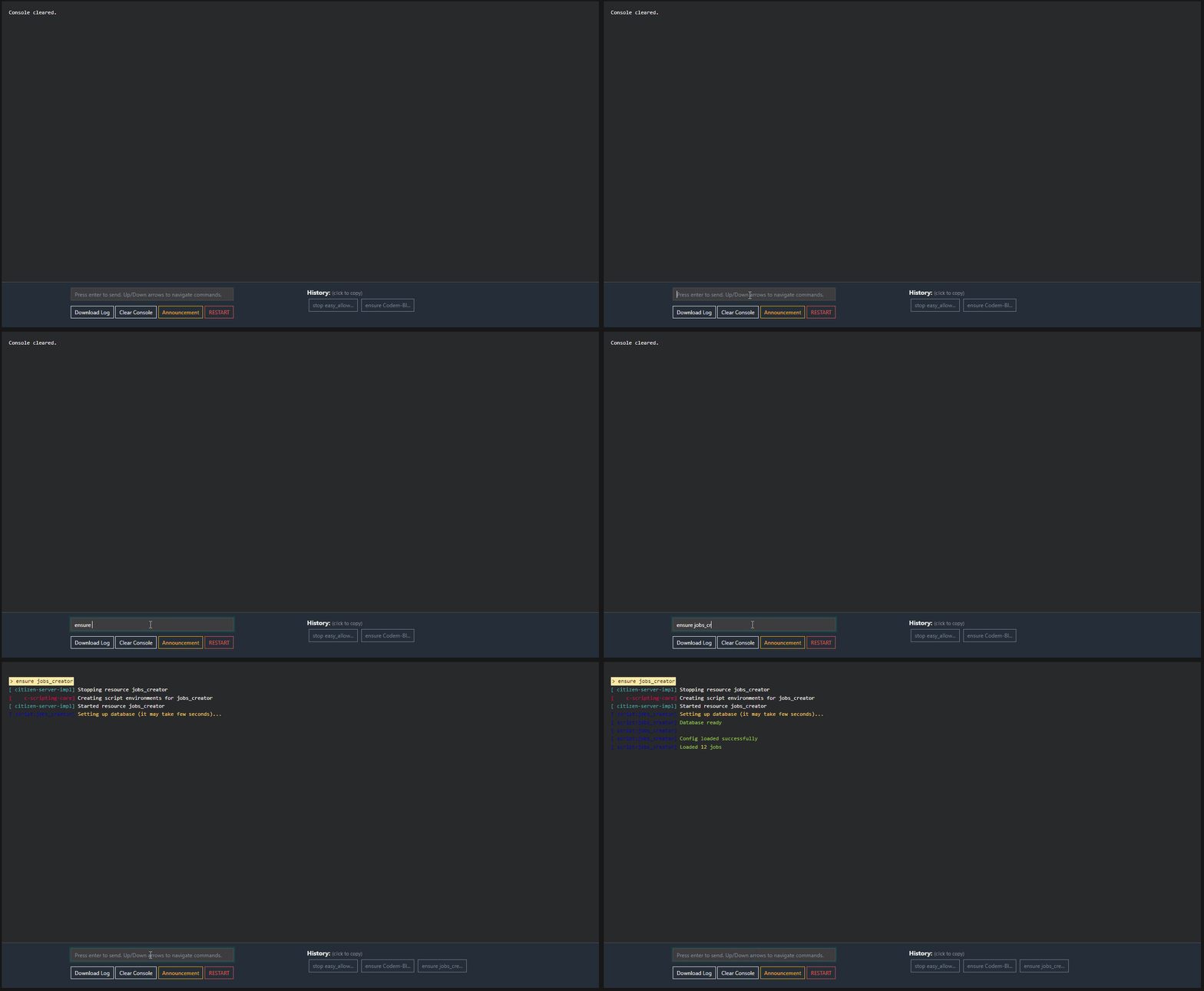 Check the txAdmin console (server console) **and** the F8 in-game console, looking for errors.
If there is any error similar to the ones in the examples below, your issue **is caused by the FiveM asset escrow system**.
### Examples of errors caused by the FiveM escrow system
Check the txAdmin console (server console) **and** the F8 in-game console, looking for errors.
If there is any error similar to the ones in the examples below, your issue **is caused by the FiveM asset escrow system**.
### Examples of errors caused by the FiveM escrow system



 ## Common causes
These are the most frequent causes across **all** escrow errors below — check these first before going into the error-specific sections:
* You're transferring the script file by file to your VPS instead of uploading the **.zip** and extracting it **after** it's already on the VPS
* You're using **FileZilla** (or your host uses it) — use [WinSCP](https://winscp.net/eng/download.php) instead
* The download was corrupted — try a clean, fresh install
* You have a virus on your server modifying script files (very likely if nothing else fixes it)
Other general requirements:
* **Minimum** server artifacts version 4752
* OneSync has to be enabled
* Use the correct license key, generated by the same account you used to download the script
It's **strongly** suggested to read all sections below carefully, since these fixes are tested by many users and are supposed to work. If none of them helps, see [What to do if nothing is fixing the errors](#what-to-do-if-nothing-is-fixing-the-errors).
You can find all of jaksam's scripts [here](https://jaksam1074-fivem-scripts.tebex.io/).
Error message **example**:
```text theme={null}
Error parsing script @jobs_creator/server/markers/job_shop.lua in resource jobs_creator: @jobs_creator/server/markers/job_shop.lua:1: syntax error near '<\1>'
```
### Possible reasons
In addition to the [common causes](#common-causes) above, this error can also happen if:
* You may have to clear the **server** caches
### How to verify my server version?
To verify what server version your server is currently using, use the following command in your FiveM server console: `version`
**Example**
## Common causes
These are the most frequent causes across **all** escrow errors below — check these first before going into the error-specific sections:
* You're transferring the script file by file to your VPS instead of uploading the **.zip** and extracting it **after** it's already on the VPS
* You're using **FileZilla** (or your host uses it) — use [WinSCP](https://winscp.net/eng/download.php) instead
* The download was corrupted — try a clean, fresh install
* You have a virus on your server modifying script files (very likely if nothing else fixes it)
Other general requirements:
* **Minimum** server artifacts version 4752
* OneSync has to be enabled
* Use the correct license key, generated by the same account you used to download the script
It's **strongly** suggested to read all sections below carefully, since these fixes are tested by many users and are supposed to work. If none of them helps, see [What to do if nothing is fixing the errors](#what-to-do-if-nothing-is-fixing-the-errors).
You can find all of jaksam's scripts [here](https://jaksam1074-fivem-scripts.tebex.io/).
Error message **example**:
```text theme={null}
Error parsing script @jobs_creator/server/markers/job_shop.lua in resource jobs_creator: @jobs_creator/server/markers/job_shop.lua:1: syntax error near '<\1>'
```
### Possible reasons
In addition to the [common causes](#common-causes) above, this error can also happen if:
* You may have to clear the **server** caches
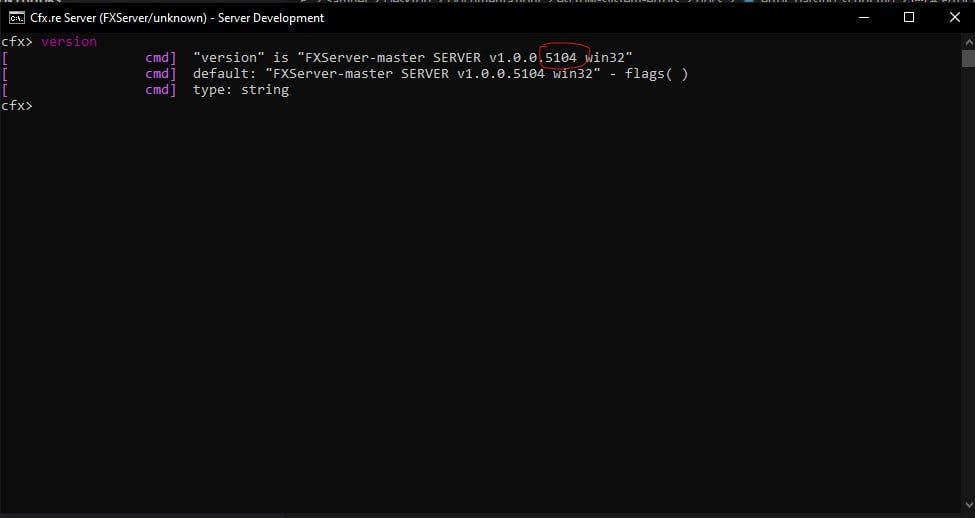
### How to verify my server version?
To verify what server version your server is currently using, use the following command in your FiveM server console: `version`
**Example**
 ### How to update my server version?
To update your server version, download the new [server artifacts](https://runtime.fivem.net/artifacts/fivem/build_server_windows/master/) and extract and replace them in your server folder.
This is the **official** [FiveM guide](https://docs.fivem.net/docs/server-manual/setting-up-a-server/) to update your server.
### My server version is already updated, but I have the error
If you have the error even though your server version is not the issue, check [Failed to verify protected resource](#failed-to-verify-protected-resource) below.
Error message example:
```text theme={null}
[svadhesive] Failed to verify protected resource jobs_creator
```
### Possible reasons
In addition to the [common causes](#common-causes) above, this error can also happen if:
* You don't have an `.fxap` file in the script folder
### Solutions
Download the script again from [FiveM Portal](https://portal.cfx.re/).
Upload the script using [WinSCP](https://winscp.net/eng/download.php) *instead of* FileZilla.
Restart the server.
Error message example:
```text theme={null}
You lack the required entitlement to use script_name
```
### Reason
All scripts using the FiveM escrow system are linked to your FiveM account (the account you used on Tebex).
In order to work, the script(s) require a server using a server key created by the same FiveM account you used on Tebex.
### What is a server key?
* The server key is generated in [FiveM Portal](https://portal.cfx.re/)
* The server key is **not** a script key
* A FiveM server can use only **1** server key
**Example of a server key in server.cfg**
```text theme={null}
sv_licenseKey "27ztq5g2pcjua67q4xywujkuzh5m7j4a"
```
### How to verify my server key?
To verify what server key your server is currently using, use the following command in your FiveM server console: `sv_licenseKey`
**Example:**
### How to update my server version?
To update your server version, download the new [server artifacts](https://runtime.fivem.net/artifacts/fivem/build_server_windows/master/) and extract and replace them in your server folder.
This is the **official** [FiveM guide](https://docs.fivem.net/docs/server-manual/setting-up-a-server/) to update your server.
### My server version is already updated, but I have the error
If you have the error even though your server version is not the issue, check [Failed to verify protected resource](#failed-to-verify-protected-resource) below.
Error message example:
```text theme={null}
[svadhesive] Failed to verify protected resource jobs_creator
```
### Possible reasons
In addition to the [common causes](#common-causes) above, this error can also happen if:
* You don't have an `.fxap` file in the script folder
### Solutions
Download the script again from [FiveM Portal](https://portal.cfx.re/).
Upload the script using [WinSCP](https://winscp.net/eng/download.php) *instead of* FileZilla.
Restart the server.
Error message example:
```text theme={null}
You lack the required entitlement to use script_name
```
### Reason
All scripts using the FiveM escrow system are linked to your FiveM account (the account you used on Tebex).
In order to work, the script(s) require a server using a server key created by the same FiveM account you used on Tebex.
### What is a server key?
* The server key is generated in [FiveM Portal](https://portal.cfx.re/)
* The server key is **not** a script key
* A FiveM server can use only **1** server key
**Example of a server key in server.cfg**
```text theme={null}
sv_licenseKey "27ztq5g2pcjua67q4xywujkuzh5m7j4a"
```
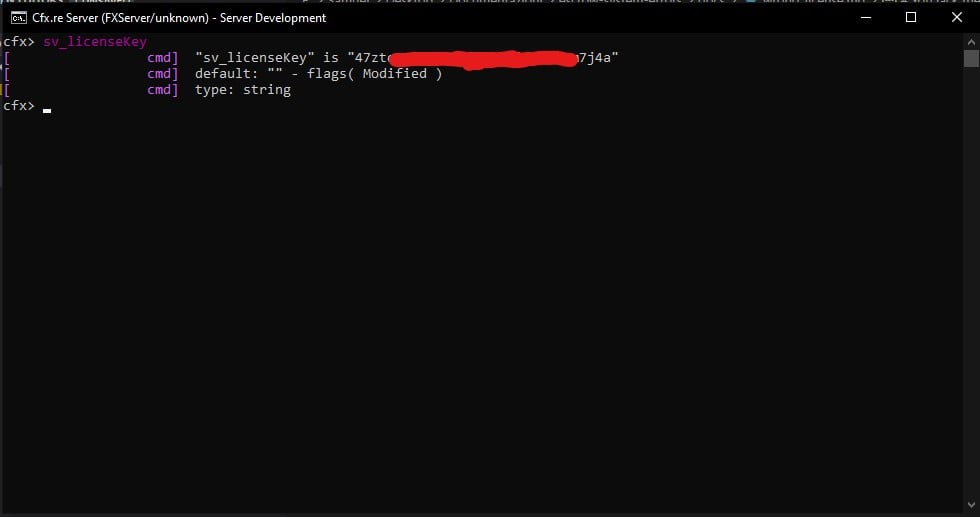
### How to verify my server key?
To verify what server key your server is currently using, use the following command in your FiveM server console: `sv_licenseKey`
**Example:**
 ### How to verify if I am using the correct server key?
Use the command `sv_licenseKey` in your FiveM server console.
Take note of the **server key** you are currently using.
Go to [FiveM Portal](https://portal.cfx.re/).
Verify if the account you are logged in with on [FiveM Portal](https://portal.cfx.re/) owns the script(s) you are trying to use. If the script is not there, it means you used a different account on Tebex, or you have transferred the script to another account.
**Example with** [**Jobs Creator script**](https://forum.cfx.re/t/jobs-creator-4-6-esx-in-game-job-creation-menu-without-server-restart/2667762)
### How to verify if I am using the correct server key?
Use the command `sv_licenseKey` in your FiveM server console.
Take note of the **server key** you are currently using.
Go to [FiveM Portal](https://portal.cfx.re/).
Verify if the account you are logged in with on [FiveM Portal](https://portal.cfx.re/) owns the script(s) you are trying to use. If the script is not there, it means you used a different account on Tebex, or you have transferred the script to another account.
**Example with** [**Jobs Creator script**](https://forum.cfx.re/t/jobs-creator-4-6-esx-in-game-job-creation-menu-without-server-restart/2667762)
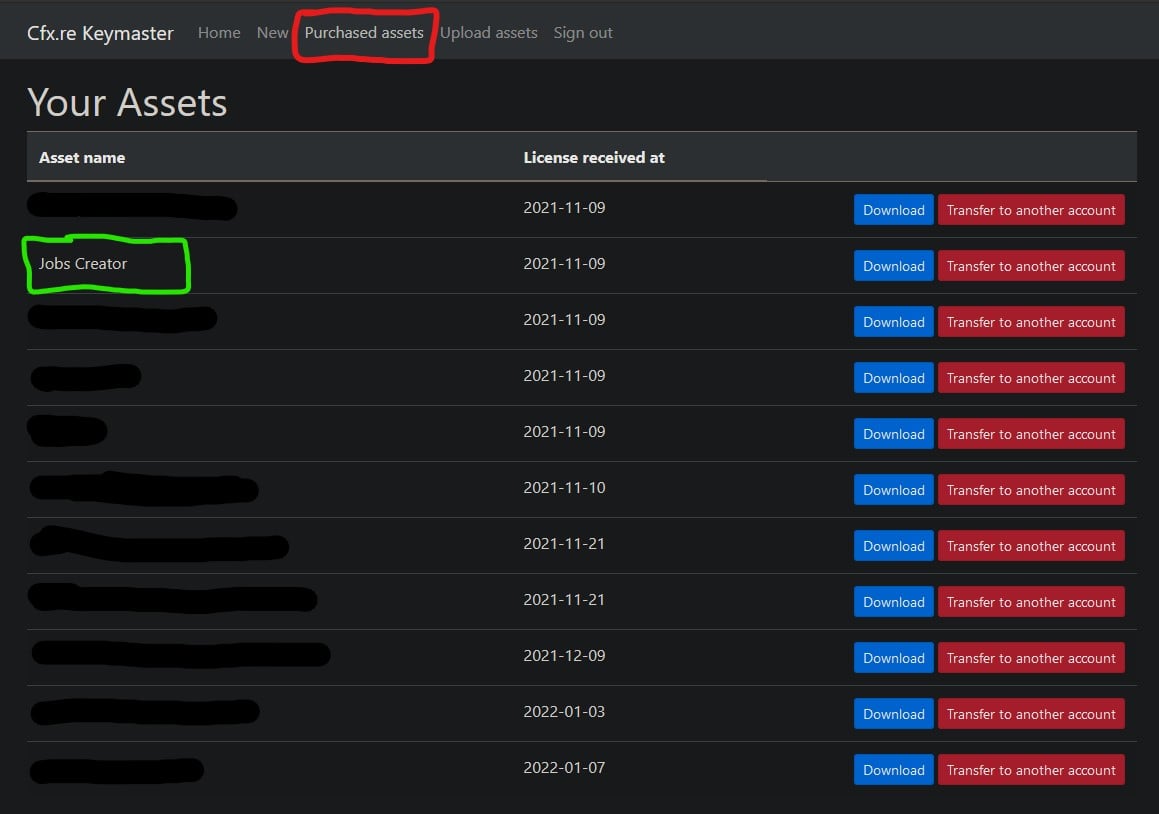 If the account you are using on [FiveM Portal](https://portal.cfx.re/) owns the script(s), verify if the **server key** your server is using is generated by the same account.
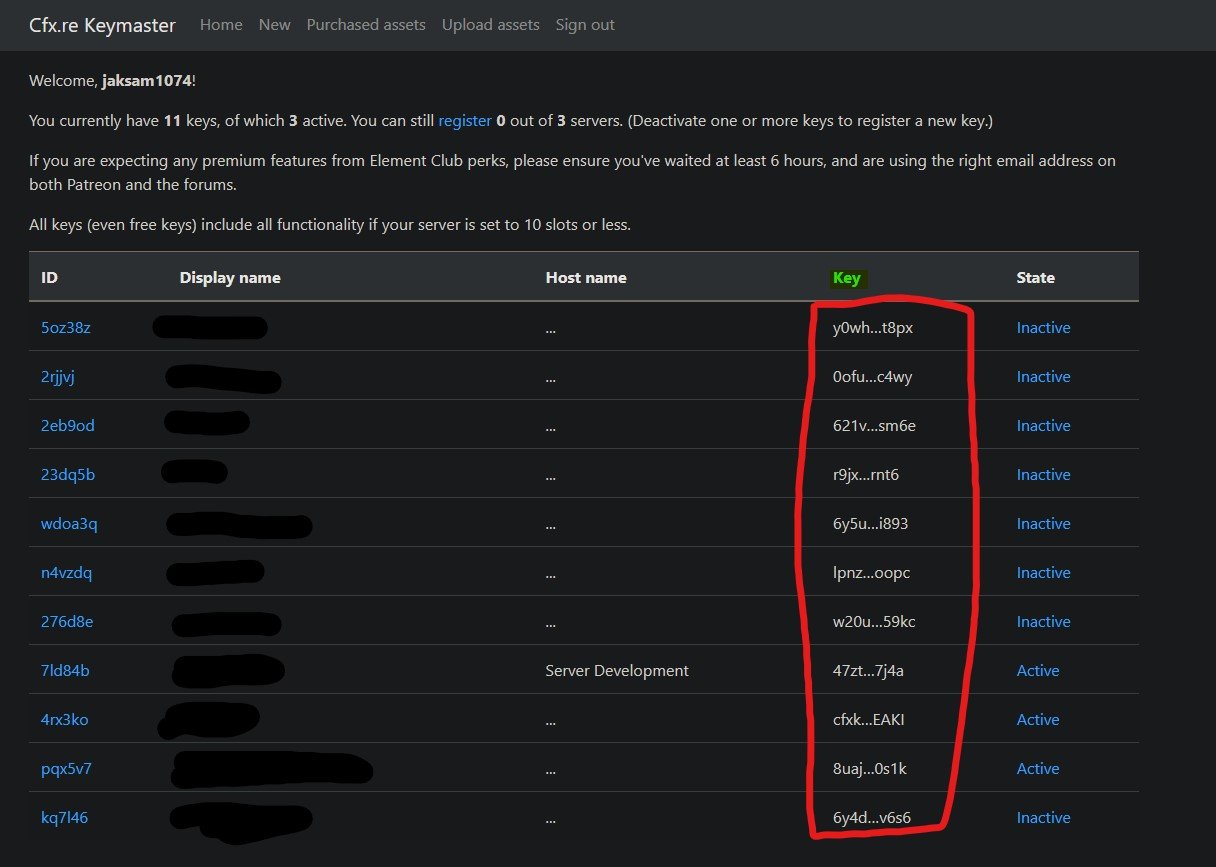 ### My server key is generated by someone else that's not me, what can I do?
You have 2 options:
* Generate a key from your account and use it
* Transfer the script ownership to the other account
### How to transfer the script to another account?
To transfer the script to another account, head to:
[FiveM Portal](https://portal.cfx.re/) → \*\*Assets \*\*tab → **Transfer to another account** red button
cfx.re decided that scripts can be transferred only 1 time, so you won't be able to transfer the script again.
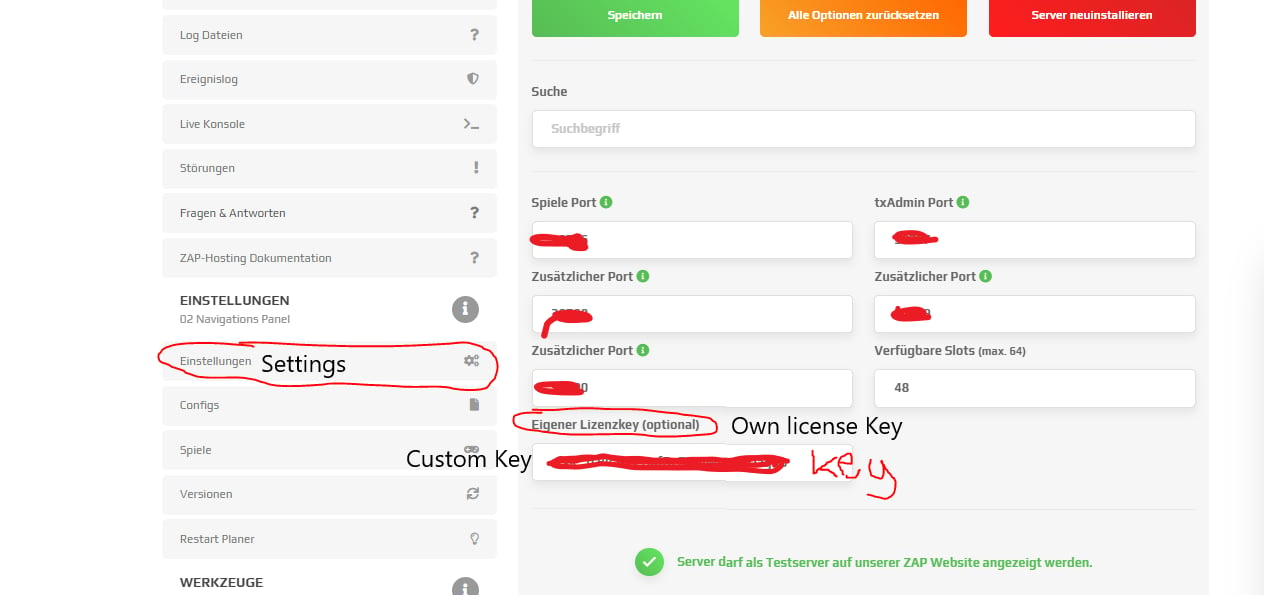
### ZAP-Hosting server key
If you are using a Zap-Hosting server, you do **not** have to enter your server key in server.cfg, but directly on their website.
[Here is the official ZAP Hosting guide for it](https://zap-hosting.com/guides/docs/en/fivem_licensekey/).
**Example screenshot:**
### My server key is generated by someone else that's not me, what can I do?
You have 2 options:
* Generate a key from your account and use it
* Transfer the script ownership to the other account
### How to transfer the script to another account?
To transfer the script to another account, head to:
[FiveM Portal](https://portal.cfx.re/) → \*\*Assets \*\*tab → **Transfer to another account** red button
cfx.re decided that scripts can be transferred only 1 time, so you won't be able to transfer the script again.
### ZAP-Hosting server key
If you are using a Zap-Hosting server, you do **not** have to enter your server key in server.cfg, but directly on their website.
[Here is the official ZAP Hosting guide for it](https://zap-hosting.com/guides/docs/en/fivem_licensekey/).
**Example screenshot:**
 ### I followed all steps but nothing is working, what can I do?
If you have followed all steps, then you just have a virus in your server. Try creating a clean server with only the default framework scripts and jaksam's scripts.
### How to verify if I have a virus in my server?
Open the file mentioned by jaksam's script with **notepad**, and scroll down to the bottom. If there is partially readable code (for example `local...`), that's a virus added by something else, because normally the entire file would be encrypted. In this case, you'll have to solve that issue before being able to use any script.
## Related topics
- [Troubleshooting](/jaksams-scripts/troubleshooting.md)
- [Common FAQ](/jaksams-scripts/common-faq.md)
- [Register item](/jaksam-inventory/functions/server/register-item.md)
- [How to enable Discord features](/easy-allowlist/how-to-enable-discord-features.md)
- [FAQ](/jobs-creator/faq.md)
### I followed all steps but nothing is working, what can I do?
If you have followed all steps, then you just have a virus in your server. Try creating a clean server with only the default framework scripts and jaksam's scripts.
### How to verify if I have a virus in my server?
Open the file mentioned by jaksam's script with **notepad**, and scroll down to the bottom. If there is partially readable code (for example `local...`), that's a virus added by something else, because normally the entire file would be encrypted. In this case, you'll have to solve that issue before being able to use any script.
## Related topics
- [Troubleshooting](/jaksams-scripts/troubleshooting.md)
- [Common FAQ](/jaksams-scripts/common-faq.md)
- [Register item](/jaksam-inventory/functions/server/register-item.md)
- [How to enable Discord features](/easy-allowlist/how-to-enable-discord-features.md)
- [FAQ](/jobs-creator/faq.md)