> ## Documentation Index
> Fetch the complete documentation index at: https://docs.jaksam-scripts.com/llms.txt
> Use this file to discover all available pages before exploring further.
# Weapon Attachments
> Map multiple weapon component IDs to a single attachment item
## Why this guide exists
In GTA V, each weapon has different component IDs for the same attachment type. For example:
* A suppressor for a Pistol uses `COMPONENT_AT_PI_SUPP`
* A suppressor for a Combat Pistol uses `COMPONENT_AT_PI_SUPP_02`
**The inventory system simplifies this:** You can create ONE item (like "suppressor") that automatically works with all compatible weapons by mapping multiple component IDs to it.
## Step-by-step guide
### Step 1: Check if the item exists
First, check if an item for your attachment type already exists in your database.
* Most common attachments (suppressor, extended clip, flashlight, etc.) should already exist
* Use `/inventory` command in-game to check existing items
* You'll need to create a new item OR add the modded weapon's component hash to an existing item
* Example: If you have a modded AK47 with a suppressor, you can add its suppressor hash to the existing "suppressor" item
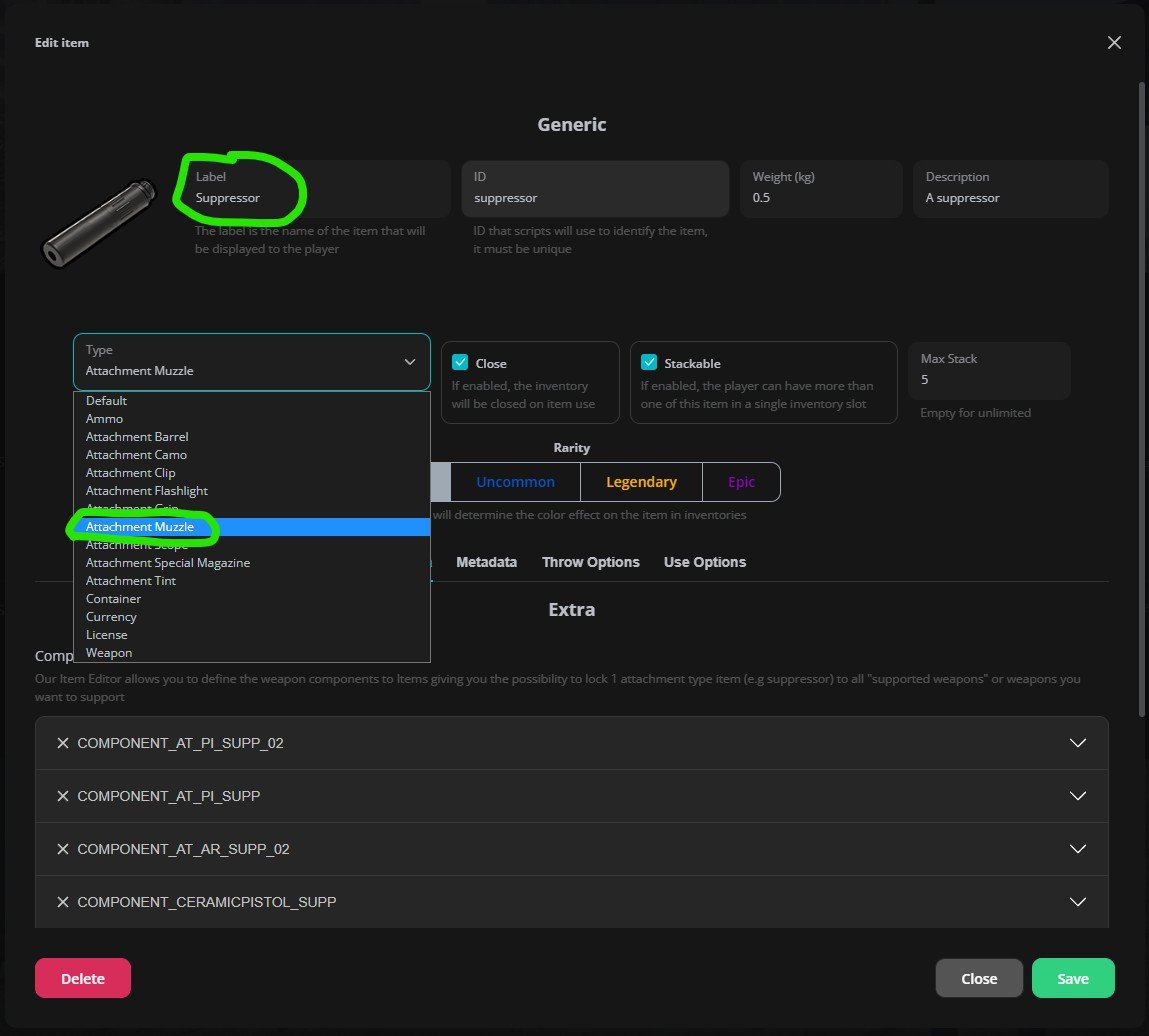
**Creating/Editing the item:**
Type `/inventory` in-game.
Create a new item or edit an existing one.
Suppressors, muzzle brakes
Magazines
Sights and optics
Tactical lights
Foregrips
 ### Step 2: Add component hashes
Now you need to add the component hash(es) that this item should apply to weapons.
**Where to find component hashes:**
* Check the [wiki](https://docs.fivem.net/docs/game-references/weapon-models/)
* Or search online for "GTA V weapon components list"
* Most likely your modded weapon script contains a text file, with the component hashes
* An example for component names, may be that they start with `COMPONENT_`
* Contact the weapon's creator/documentation if you can't find it
**How to add them:**
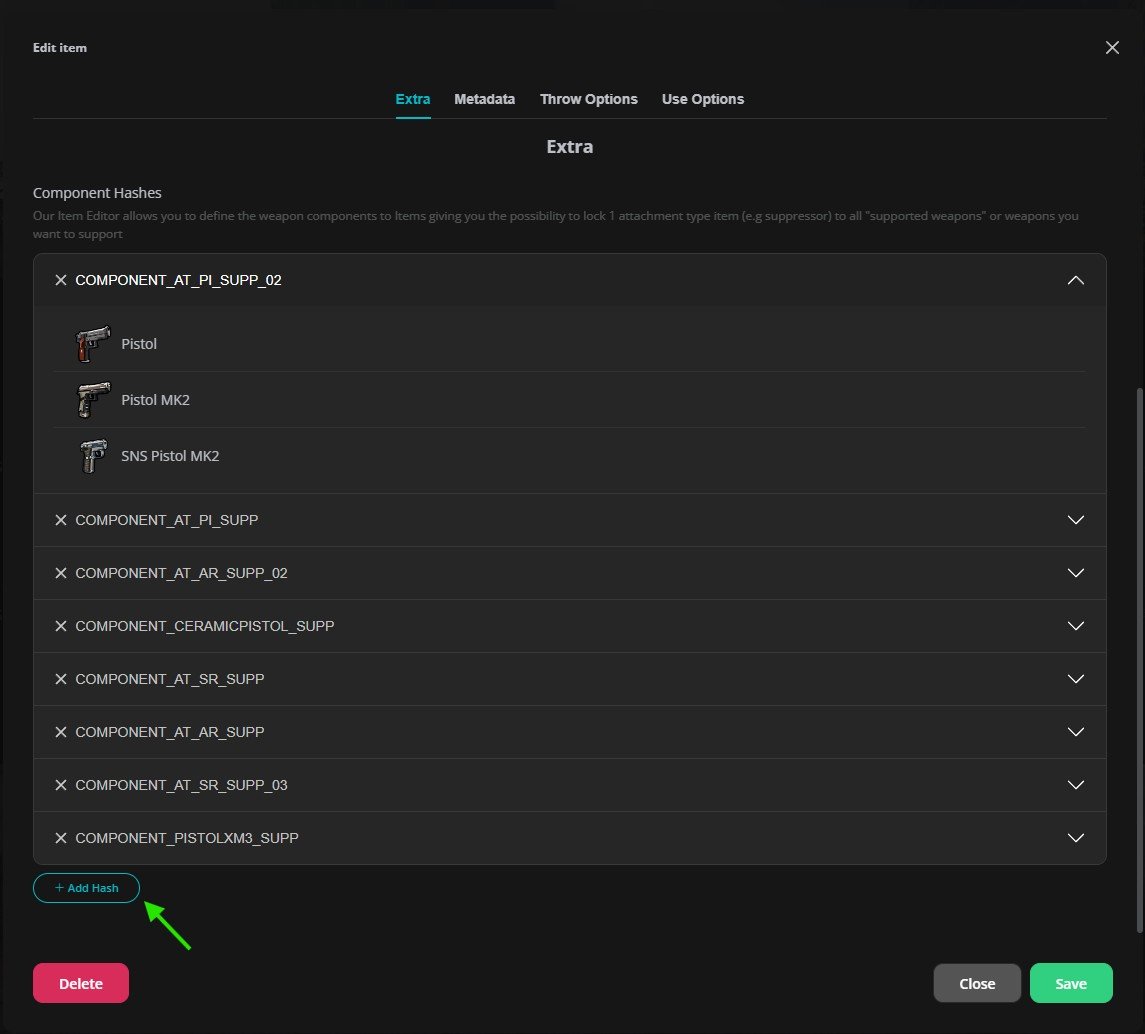
In the item edit screen for the attachment item, find the "Component Hashes" section.
Click "Add Component Hash".
Enter the component hash (e.g., `COMPONENT_AT_PI_SUPP`).
Repeat for all components you want this attachment to work with.
The menu will show you what weapons are compatible with each component hash you add.
### Step 2: Add component hashes
Now you need to add the component hash(es) that this item should apply to weapons.
**Where to find component hashes:**
* Check the [wiki](https://docs.fivem.net/docs/game-references/weapon-models/)
* Or search online for "GTA V weapon components list"
* Most likely your modded weapon script contains a text file, with the component hashes
* An example for component names, may be that they start with `COMPONENT_`
* Contact the weapon's creator/documentation if you can't find it
**How to add them:**
In the item edit screen for the attachment item, find the "Component Hashes" section.
Click "Add Component Hash".
Enter the component hash (e.g., `COMPONENT_AT_PI_SUPP`).
Repeat for all components you want this attachment to work with.
The menu will show you what weapons are compatible with each component hash you add.
 ### Step 3: Test in-game
`/giveitem [your_id] [item_name] 1` or through omnipack (`F1` while inventory is open).
Give yourself a compatible weapon.
Try to attach the component.
That's it! The system will automatically apply the correct component based on the weapon.
## Complete Example
Let's say you want to add a suppressor for a modded weapon called "WEAPON\_MODDEDAK47":
Open `/inventory` and search for "suppressor" - it exists!
Click edit on the suppressor item.
Add `COMPONENT_MODDEDAK47_SUPP` to the component hashes list.
Save the item.
Give yourself the suppressor and the modded AK47, then try attaching it.
## Related topics
- [Weapon Stolen](/jobs-creator/server/search-steal-action/weapon-stolen.md)
- [Dequip weapon](/jaksam-inventory/functions/client/dequip-weapon.md)
- [Add weapon to armory](/jobs-creator/server/armory/add-weapon-to-armory.md)
- [Set weapon wheel](/jaksam-inventory/functions/client/set-weapon-wheel.md)
- [Remove weapon from armory](/jobs-creator/server/armory/remove-weapon-from-armory.md)
### Step 3: Test in-game
`/giveitem [your_id] [item_name] 1` or through omnipack (`F1` while inventory is open).
Give yourself a compatible weapon.
Try to attach the component.
That's it! The system will automatically apply the correct component based on the weapon.
## Complete Example
Let's say you want to add a suppressor for a modded weapon called "WEAPON\_MODDEDAK47":
Open `/inventory` and search for "suppressor" - it exists!
Click edit on the suppressor item.
Add `COMPONENT_MODDEDAK47_SUPP` to the component hashes list.
Save the item.
Give yourself the suppressor and the modded AK47, then try attaching it.
## Related topics
- [Weapon Stolen](/jobs-creator/server/search-steal-action/weapon-stolen.md)
- [Dequip weapon](/jaksam-inventory/functions/client/dequip-weapon.md)
- [Add weapon to armory](/jobs-creator/server/armory/add-weapon-to-armory.md)
- [Set weapon wheel](/jaksam-inventory/functions/client/set-weapon-wheel.md)
- [Remove weapon from armory](/jobs-creator/server/armory/remove-weapon-from-armory.md)