> ## Documentation Index
> Fetch the complete documentation index at: https://docs.jaksam-scripts.com/llms.txt
> Use this file to discover all available pages before exploring further.
# Context Actions
> Add custom right-click buttons to items, either individually or by item type
Context Actions are custom buttons that appear when you right-click an item in your inventory. They allow players to perform specific actions on items, like using, inspecting, or any custom behavior you want.
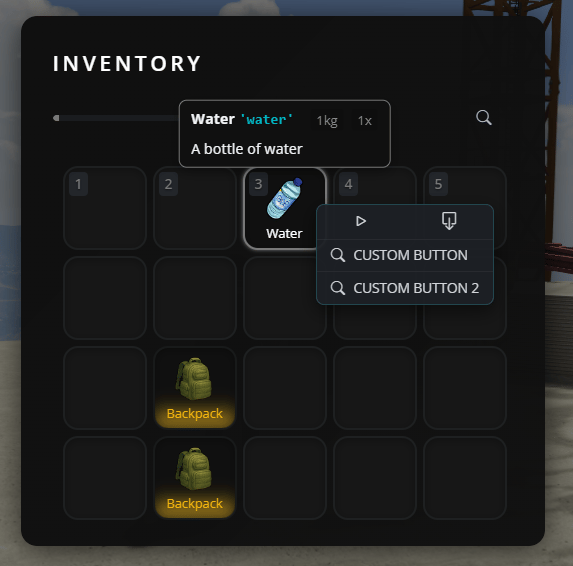
 ## When to use each method
Use when you want buttons for ONE specific item (e.g., only on "water" item)
Use when you want the same buttons on ALL items of the same type (e.g., all weapons, all containers)
## Method 1: Adding buttons to a single item
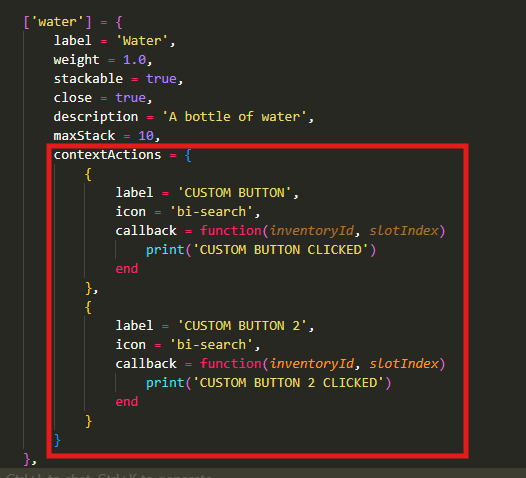
To add custom buttons to a single specific item, open `jaksam_inventory/_data/items.lua` and find or create your item. Add the `contextActions` property:
```lua theme={null}
['water'] = {
label = 'Water',
weight = 1.0,
stackable = true,
close = true,
description = 'A bottle of water',
maxStack = 10,
contextActions = {
{
label = 'Drink', -- Button text that players see
icon = 'bi-droplet', -- Icon (Bootstrap Icons)
callback = function(inventoryId, slotIndex)
-- Your code here - this runs when the button is clicked
TriggerServerEvent('myserver:drinkWater', inventoryId, slotIndex)
end
},
{
label = 'Check expiration',
icon = 'bi-calendar-check',
callback = function(inventoryId, slotIndex)
print('Checking expiration date...')
-- Add your logic here
end
}
}
},
```
**Important notes:**
* `inventoryId`: Identifies which inventory the item is in (player inventory, vehicle trunk, etc.)
* `slotIndex`: The slot number where the item is located
* `icon`: Use Bootstrap Icons (search "bootstrap icons" online to find icon names)
## Method 2: Adding buttons to all items of a specific type
If you want the same buttons to appear on ALL items of the same type (like all weapons, all food items, etc.), use the defaults system.
Open `jaksam_inventory/_data/defaults.lua` and add or modify the type you want:
```lua theme={null}
Script.defaultsByType = {
['weapon'] = {
displayFields = {
-- ... existing display fields ...
},
contextActions = {
{
label = 'Empty ammo',
icon = 'bi-asterisk',
callback = function(inventoryId, slotIndex)
TriggerServerEvent(Utils.eventsPrefix .. ":emptyAmmo", inventoryId, slotIndex)
end
},
{
label = 'View components',
icon = 'bi-eye',
callback = function(inventoryId, slotIndex)
Script.closeInventoryUI()
Script.viewComponents(inventoryId, slotIndex)
end
}
}
},
['food'] = {
contextActions = {
{
label = 'Eat',
icon = 'bi-egg-fried',
callback = function(inventoryId, slotIndex)
TriggerServerEvent('myserver:eatFood', inventoryId, slotIndex)
end
}
}
},
}
```
This means:
* ALL items with `type = 'weapon'` will have "Empty ammo" and "View components" buttons
* ALL items with `type = 'food'` will have an "Eat" button
## Adding global buttons to ALL items
You can also add buttons that appear on EVERY item in the game using the special `['*']` key:
```lua theme={null}
Script.defaultsByType = {
['*'] = {
contextActions = {
{
label = 'Inspect',
icon = 'bi-search',
callback = function(inventoryId, slotIndex)
print('Inspecting item...')
-- Your code here
end
}
}
},
}
```
## Related topics
- [Action Buttons](/jaksam-inventory/guides/action-buttons.md)
- [Actions](/jobs-creator/client/actions/index.md)
- [Actions in external menus](/jobs-creator/client/actions/using-the-actions-in-a-radial-external-menu.md)
- [Open actions menu](/jobs-creator/client/actions/open-actions-menu.md)
- [Nexus Terms](/jaksams-scripts/nexus-terms.md)
## When to use each method
Use when you want buttons for ONE specific item (e.g., only on "water" item)
Use when you want the same buttons on ALL items of the same type (e.g., all weapons, all containers)
## Method 1: Adding buttons to a single item
To add custom buttons to a single specific item, open `jaksam_inventory/_data/items.lua` and find or create your item. Add the `contextActions` property:
```lua theme={null}
['water'] = {
label = 'Water',
weight = 1.0,
stackable = true,
close = true,
description = 'A bottle of water',
maxStack = 10,
contextActions = {
{
label = 'Drink', -- Button text that players see
icon = 'bi-droplet', -- Icon (Bootstrap Icons)
callback = function(inventoryId, slotIndex)
-- Your code here - this runs when the button is clicked
TriggerServerEvent('myserver:drinkWater', inventoryId, slotIndex)
end
},
{
label = 'Check expiration',
icon = 'bi-calendar-check',
callback = function(inventoryId, slotIndex)
print('Checking expiration date...')
-- Add your logic here
end
}
}
},
```
**Important notes:**
* `inventoryId`: Identifies which inventory the item is in (player inventory, vehicle trunk, etc.)
* `slotIndex`: The slot number where the item is located
* `icon`: Use Bootstrap Icons (search "bootstrap icons" online to find icon names)
## Method 2: Adding buttons to all items of a specific type
If you want the same buttons to appear on ALL items of the same type (like all weapons, all food items, etc.), use the defaults system.
Open `jaksam_inventory/_data/defaults.lua` and add or modify the type you want:
```lua theme={null}
Script.defaultsByType = {
['weapon'] = {
displayFields = {
-- ... existing display fields ...
},
contextActions = {
{
label = 'Empty ammo',
icon = 'bi-asterisk',
callback = function(inventoryId, slotIndex)
TriggerServerEvent(Utils.eventsPrefix .. ":emptyAmmo", inventoryId, slotIndex)
end
},
{
label = 'View components',
icon = 'bi-eye',
callback = function(inventoryId, slotIndex)
Script.closeInventoryUI()
Script.viewComponents(inventoryId, slotIndex)
end
}
}
},
['food'] = {
contextActions = {
{
label = 'Eat',
icon = 'bi-egg-fried',
callback = function(inventoryId, slotIndex)
TriggerServerEvent('myserver:eatFood', inventoryId, slotIndex)
end
}
}
},
}
```
This means:
* ALL items with `type = 'weapon'` will have "Empty ammo" and "View components" buttons
* ALL items with `type = 'food'` will have an "Eat" button
## Adding global buttons to ALL items
You can also add buttons that appear on EVERY item in the game using the special `['*']` key:
```lua theme={null}
Script.defaultsByType = {
['*'] = {
contextActions = {
{
label = 'Inspect',
icon = 'bi-search',
callback = function(inventoryId, slotIndex)
print('Inspecting item...')
-- Your code here
end
}
}
},
}
```
## Related topics
- [Action Buttons](/jaksam-inventory/guides/action-buttons.md)
- [Actions](/jobs-creator/client/actions/index.md)
- [Actions in external menus](/jobs-creator/client/actions/using-the-actions-in-a-radial-external-menu.md)
- [Open actions menu](/jobs-creator/client/actions/open-actions-menu.md)
- [Nexus Terms](/jaksams-scripts/nexus-terms.md)