> ## Documentation Index
> Fetch the complete documentation index at: https://docs.jaksam-scripts.com/llms.txt
> Use this file to discover all available pages before exploring further.
# Action Buttons
> Add custom always-visible buttons to the inventory toolbar for menus, jobs, and quick actions
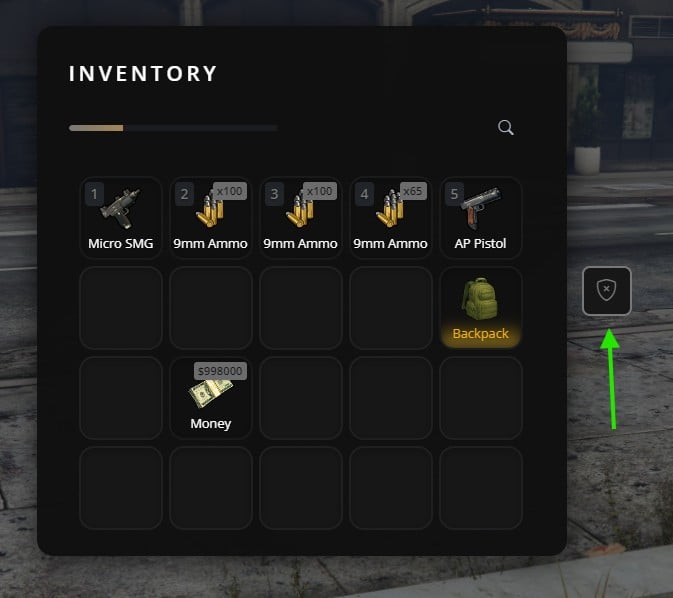
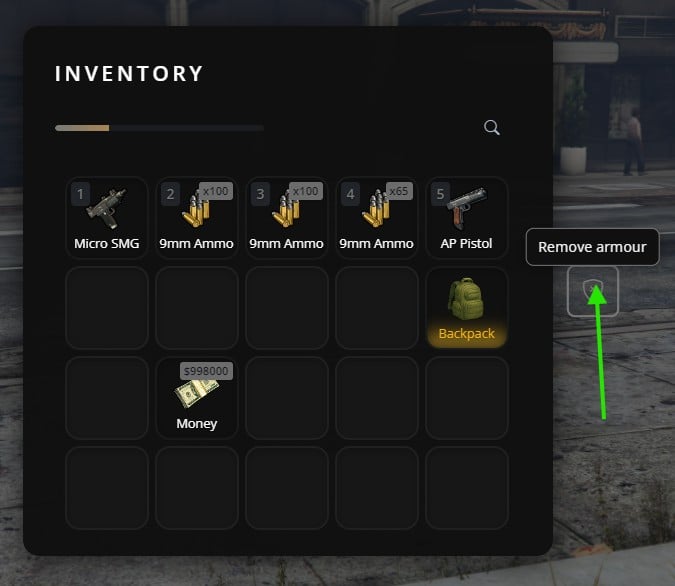
Action buttons are custom buttons that appear in the inventory UI toolbar. Unlike [Context Actions](/jaksam-inventory/guides/context-actions) (which appear when right-clicking an item), action buttons are always visible in the inventory header and can trigger any custom logic.
 ## When to use Action Buttons
Use action buttons when you need:
* A button always visible in the inventory (not item-specific)
* Quick access to features like "Police Menu", "Garage", "Crafting", etc.
* Job-specific or role-specific actions
## Basic Usage
### Registering a button
```lua theme={null}
exports['jaksam_inventory']:registerActionButton(
'my_button', -- Unique ID
'bi-star-fill', -- Bootstrap Icons class
'My Tooltip', -- Tooltip on hover (or nil)
function() -- Click callback
print('Clicked!')
end,
true -- Visible (default: true)
)
```
### Removing a button
```lua theme={null}
exports['jaksam_inventory']:unregisterActionButton('my_button')
```
### Showing/Hiding without removing
```lua theme={null}
-- Hide (button stays registered, just invisible)
exports['jaksam_inventory']:hideActionButton('my_button')
-- Show again
exports['jaksam_inventory']:showActionButton('my_button')
```
## Practical Examples
Register the button once when the resource starts, then show/hide based on job:
```lua theme={null}
-- Register on resource start (hidden by default)
CreateThread(function()
exports['jaksam_inventory']:registerActionButton(
'police_menu',
'bi-shield-check',
'Police Actions',
function()
TriggerEvent('police:openActionsMenu')
end,
false -- Start hidden
)
end)
-- Show/hide based on job changes
AddEventHandler('esx:setJob', function(job)
if job.name == 'police' then
exports['jaksam_inventory']:showActionButton('police_menu')
else
exports['jaksam_inventory']:hideActionButton('police_menu')
end
end)
-- Also check on player load
RegisterNetEvent('esx:playerLoaded', function(xPlayer)
if xPlayer.job.name == 'police' then
exports['jaksam_inventory']:showActionButton('police_menu')
end
end)
```
```lua theme={null}
exports['jaksam_inventory']:registerActionButton(
'open_personal_stash',
'bi-box-seam',
'Personal Stash',
function()
exports['jaksam_inventory']:openInventory('personal_stash_' .. GetPlayerServerId(PlayerId()))
end
)
```
```lua theme={null}
exports['jaksam_inventory']:registerActionButton(
'crafting_menu',
'bi-hammer',
'Crafting',
function()
TriggerEvent('crafting:openMenu')
end
)
```
```lua theme={null}
local jobButtons = {
police = { id = 'btn_police', icon = 'bi-shield-check', tooltip = 'Police Menu', event = 'police:menu' },
ambulance = { id = 'btn_ambulance', icon = 'bi-heart-pulse', tooltip = 'EMS Menu', event = 'ambulance:menu' },
mechanic = { id = 'btn_mechanic', icon = 'bi-tools', tooltip = 'Mechanic Tools', event = 'mechanic:menu' },
}
-- Register all buttons as hidden
CreateThread(function()
for _, btn in pairs(jobButtons) do
exports['jaksam_inventory']:registerActionButton(
btn.id,
btn.icon,
btn.tooltip,
function()
TriggerEvent(btn.event)
end,
false
)
end
end)
-- Show correct button based on job
AddEventHandler('esx:setJob', function(job)
-- Hide all job buttons
for _, btn in pairs(jobButtons) do
exports['jaksam_inventory']:hideActionButton(btn.id)
end
-- Show the one for current job (if exists)
if jobButtons[job.name] then
exports['jaksam_inventory']:showActionButton(jobButtons[job.name].id)
end
end)
```
## Important Notes
Each button must have a unique ID. Registering with the same ID will overwrite the previous button.
Buttons survive inventory open/close but are lost on resource restart. Re-register them when your resource starts.
Don't register/unregister buttons repeatedly. Register once, then use show/hide to toggle visibility.
## Related topics
- [Register action button](/jaksam-inventory/functions/client/register-action-button.md)
- [Show action button](/jaksam-inventory/functions/client/show-action-button.md)
- [Hide action button](/jaksam-inventory/functions/client/hide-action-button.md)
- [Unregister action button](/jaksam-inventory/functions/client/unregister-action-button.md)
- [Client](/jaksam-inventory/functions/client/index.md)
## When to use Action Buttons
Use action buttons when you need:
* A button always visible in the inventory (not item-specific)
* Quick access to features like "Police Menu", "Garage", "Crafting", etc.
* Job-specific or role-specific actions
## Basic Usage
### Registering a button
```lua theme={null}
exports['jaksam_inventory']:registerActionButton(
'my_button', -- Unique ID
'bi-star-fill', -- Bootstrap Icons class
'My Tooltip', -- Tooltip on hover (or nil)
function() -- Click callback
print('Clicked!')
end,
true -- Visible (default: true)
)
```
### Removing a button
```lua theme={null}
exports['jaksam_inventory']:unregisterActionButton('my_button')
```
### Showing/Hiding without removing
```lua theme={null}
-- Hide (button stays registered, just invisible)
exports['jaksam_inventory']:hideActionButton('my_button')
-- Show again
exports['jaksam_inventory']:showActionButton('my_button')
```
## Practical Examples
Register the button once when the resource starts, then show/hide based on job:
```lua theme={null}
-- Register on resource start (hidden by default)
CreateThread(function()
exports['jaksam_inventory']:registerActionButton(
'police_menu',
'bi-shield-check',
'Police Actions',
function()
TriggerEvent('police:openActionsMenu')
end,
false -- Start hidden
)
end)
-- Show/hide based on job changes
AddEventHandler('esx:setJob', function(job)
if job.name == 'police' then
exports['jaksam_inventory']:showActionButton('police_menu')
else
exports['jaksam_inventory']:hideActionButton('police_menu')
end
end)
-- Also check on player load
RegisterNetEvent('esx:playerLoaded', function(xPlayer)
if xPlayer.job.name == 'police' then
exports['jaksam_inventory']:showActionButton('police_menu')
end
end)
```
```lua theme={null}
exports['jaksam_inventory']:registerActionButton(
'open_personal_stash',
'bi-box-seam',
'Personal Stash',
function()
exports['jaksam_inventory']:openInventory('personal_stash_' .. GetPlayerServerId(PlayerId()))
end
)
```
```lua theme={null}
exports['jaksam_inventory']:registerActionButton(
'crafting_menu',
'bi-hammer',
'Crafting',
function()
TriggerEvent('crafting:openMenu')
end
)
```
```lua theme={null}
local jobButtons = {
police = { id = 'btn_police', icon = 'bi-shield-check', tooltip = 'Police Menu', event = 'police:menu' },
ambulance = { id = 'btn_ambulance', icon = 'bi-heart-pulse', tooltip = 'EMS Menu', event = 'ambulance:menu' },
mechanic = { id = 'btn_mechanic', icon = 'bi-tools', tooltip = 'Mechanic Tools', event = 'mechanic:menu' },
}
-- Register all buttons as hidden
CreateThread(function()
for _, btn in pairs(jobButtons) do
exports['jaksam_inventory']:registerActionButton(
btn.id,
btn.icon,
btn.tooltip,
function()
TriggerEvent(btn.event)
end,
false
)
end
end)
-- Show correct button based on job
AddEventHandler('esx:setJob', function(job)
-- Hide all job buttons
for _, btn in pairs(jobButtons) do
exports['jaksam_inventory']:hideActionButton(btn.id)
end
-- Show the one for current job (if exists)
if jobButtons[job.name] then
exports['jaksam_inventory']:showActionButton(jobButtons[job.name].id)
end
end)
```
## Important Notes
Each button must have a unique ID. Registering with the same ID will overwrite the previous button.
Buttons survive inventory open/close but are lost on resource restart. Re-register them when your resource starts.
Don't register/unregister buttons repeatedly. Register once, then use show/hide to toggle visibility.
## Related topics
- [Register action button](/jaksam-inventory/functions/client/register-action-button.md)
- [Show action button](/jaksam-inventory/functions/client/show-action-button.md)
- [Hide action button](/jaksam-inventory/functions/client/hide-action-button.md)
- [Unregister action button](/jaksam-inventory/functions/client/unregister-action-button.md)
- [Client](/jaksam-inventory/functions/client/index.md)