> ## Documentation Index
> Fetch the complete documentation index at: https://docs.jaksam-scripts.com/llms.txt
> Use this file to discover all available pages before exploring further.
# Instalación
> Instala Robberies Creator en tu servidor de FiveM con ESX, QBCore u OX Inventory, incluyendo scripts de minijuegos opcionales y configuración de items por defecto.
La instalación del script es extremadamente fácil.
## Requisitos
* **ESX**, **QBCore** u **OX Inventory**
* El [script de caja fuerte](https://github.com/VHall1/pd-safe) de [VHall1](https://github.com/VHall1)
* El [script de ganzúa](https://github.com/baguscodestudio/lockpick) de [baguscodestudio](https://github.com/baguscodestudio/lockpick)
* Scripts de minijuegos opcionales (ver abajo) si quieres usarlos
**NO** uses FileZilla para subir los archivos, de lo contrario el script **NO** funcionará.
Usa [WinSCP](https://winscp.net/eng/download.php) en su lugar.
Descarga el script y extráelo en tus resources.
Añade el script en tu auto start (ejemplo: `server.cfg`).
El script configurará la base de datos **automáticamente**. En caso de que no lo haga, puedes ejecutar manualmente los archivos de la carpeta `robberies_creator/sql/`.
Descarga e inicia el [script de caja fuerte](https://github.com/VHall1/pd-safe) *(créditos a [VHall1](https://github.com/VHall1))*.
Descarga e inicia el [script de ganzúa](https://github.com/baguscodestudio/lockpick) *(créditos a [baguscodestudio](https://github.com/baguscodestudio/lockpick))*.
* Descarga e inicia el [script de minijuego datacrack](https://github.com/utkuali/datacrack) *(créditos a [utkuali](https://github.com/utkuali))*
* Descarga e inicia el [script de minijuego de huellas dactilares](https://github.com/utkuali/Finger-Print-Hacking-Game) *(créditos a [utkuali](https://github.com/utkuali))*
* Descarga e inicia el [script de minijuego de memoria](https://github.com/ultrahacx/ultra-keypackhack) *(créditos a [ultrahacx](https://github.com/ultrahacx))*
### Añadir los items — Opcional
Para añadir los items predefinidos, solo tienes que ejecutar el archivo `robberies_creator/sql/items_limit.sql` **o** `robberies_creator/sql/items_weight.sql`, dependiendo de si tu servidor usa limit o weight.
La última versión de ESX usa **weight**.
Si no funciona, asegúrate de usar la última versión oficial de ESX con las dependencias necesarias.
Descarga el script y extráelo en tus resources.
Añade el script en tu auto start (ejemplo: `server.cfg`).
El script configurará la base de datos **automáticamente**. En caso de que no lo haga, puedes ejecutar manualmente los archivos de la carpeta `robberies_creator/sql/`.
Descarga e inicia el [script de caja fuerte](https://github.com/VHall1/pd-safe) *(créditos a [VHall1](https://github.com/VHall1))*.
Descarga e inicia el [script de ganzúa](https://github.com/baguscodestudio/lockpick) *(créditos a [baguscodestudio](https://github.com/baguscodestudio/lockpick))*.
* Descarga e inicia el [script de minijuego datacrack](https://github.com/utkuali/datacrack) *(créditos a [utkuali](https://github.com/utkuali))*
* Descarga e inicia el [script de minijuego de huellas dactilares](https://github.com/utkuali/Finger-Print-Hacking-Game) *(créditos a [utkuali](https://github.com/utkuali))*
* Descarga e inicia el [script de minijuego de memoria](https://github.com/ultrahacx/ultra-keypackhack) *(créditos a [ultrahacx](https://github.com/ultrahacx))*
### Añadir los items — Opcional
Para añadir los nuevos items, edita el archivo `qb-core/shared/items.lua` y añade el siguiente código al final de la tabla:
```lua theme={null}
-- Items de Robberies Creator
['hacking_computer'] = {['name'] = 'hacking_computer', ['label'] = 'Hacking computer', ['weight'] = 500, ['type'] = 'item', ['image'] = 'your_image.png', ['unique'] = false, ['useable'] = true, ['shouldClose'] = true, ['combinable'] = nil, ['description'] = 'Computer to hack panels'},
['thermal_charge'] = {['name'] = 'thermal_charge', ['label'] = 'Thermal charge', ['weight'] = 500, ['type'] = 'item', ['image'] = 'your_image.png', ['unique'] = false, ['useable'] = true, ['shouldClose'] = true, ['combinable'] = nil, ['description'] = 'Use to melt some doors'},
['gas_mask'] = {['name'] = 'gas_mask', ['label'] = 'Gas mask', ['weight'] = 500, ['type'] = 'item', ['image'] = 'your_image.png', ['unique'] = false, ['useable'] = true, ['shouldClose'] = true, ['combinable'] = nil, ['description'] = 'Protects from lethal gas'},
['drill'] = {['name'] = 'drill', ['label'] = 'Drill', ['weight'] = 500, ['type'] = 'item', ['image'] = 'your_image.png', ['unique'] = false, ['useable'] = true, ['shouldClose'] = true, ['combinable'] = nil, ['description'] = 'Can be used to open trucks doors'},
['gold_ingot'] = {['name'] = 'gold_ingot', ['label'] = 'Gold ingot', ['weight'] = 500, ['type'] = 'item', ['image'] = 'your_image.png', ['unique'] = false, ['useable'] = true, ['shouldClose'] = true, ['combinable'] = nil, ['description'] = 'Goooold'},
['diamonds_box'] = {['name'] = 'diamonds_box', ['label'] = 'Diamond box', ['weight'] = 500, ['type'] = 'item', ['image'] = 'your_image.png', ['unique'] = false, ['useable'] = true, ['shouldClose'] = true, ['combinable'] = nil, ['description'] = 'Diamooonds'},
['lockpick'] = {['name'] = 'lockpick', ['label'] = 'Lockpick', ['weight'] = 500, ['type'] = 'item', ['image'] = 'your_image.png', ['unique'] = false, ['useable'] = true, ['shouldClose'] = true, ['combinable'] = nil, ['description'] = 'Used to lockpick doors'},
['painting'] = {['name'] = 'painting', ['label'] = 'Painting', ['weight'] = 500, ['type'] = 'item', ['image'] = 'your_image.png', ['unique'] = false, ['useable'] = true, ['shouldClose'] = true, ['combinable'] = nil, ['description'] = 'Expensive painting'},
```
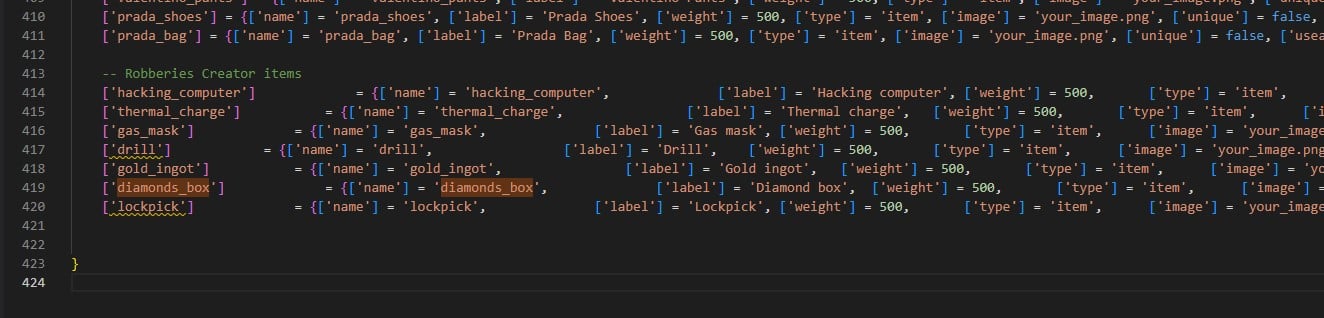 Aquí tienes una lista de items para usar con OX Inventory. Incluso puedes usarla con el inventario de jaksam, en la opción "import from code".
```lua theme={null}
['hacking_computer'] = {
label = 'Hacking computer',
weight = 500,
stack = true,
close = true,
description = 'Computer to hack panels'
},
['thermal_charge'] = {
label = 'Thermal charge',
weight = 500,
stack = true,
close = true,
description = 'Use to melt some doors'
},
['gas_mask'] = {
label = 'Gas mask',
weight = 500,
stack = true,
close = true,
description = 'Protects from lethal gas'
},
['drill'] = {
label = 'Drill',
weight = 500,
stack = true,
close = true,
description = 'Can be used to open trucks doors'
},
['gold_ingot'] = {
label = 'Gold ingot',
weight = 500,
stack = true,
close = true,
description = 'Goooold'
},
['diamonds_box'] = {
label = 'Diamond box',
weight = 500,
stack = true,
close = true,
description = 'Diamooonds'
},
['lockpick'] = {
label = 'Lockpick',
weight = 500,
stack = true,
close = true,
description = 'Used to lockpick doors'
},
['painting'] = {
label = 'Painting',
weight = 500,
stack = true,
close = true,
description = 'Expensive painting'
},
```
¡Ya estás listo! Disfruta del script 😁
## Verificación
Abre `/robberiescreator` in-game. Si el menú se abre, el script está funcionando correctamente.
## Paso opcional
Después de configurar correctamente la base de datos, puedes eliminar los archivos de la carpeta `robberies_creator/sql/`, para que el script no intente configurarla de nuevo cada vez que lo inicies.
This documentation is built and hosted on [Mintlify](https://mintlify.com), a developer documentation platform.
Aquí tienes una lista de items para usar con OX Inventory. Incluso puedes usarla con el inventario de jaksam, en la opción "import from code".
```lua theme={null}
['hacking_computer'] = {
label = 'Hacking computer',
weight = 500,
stack = true,
close = true,
description = 'Computer to hack panels'
},
['thermal_charge'] = {
label = 'Thermal charge',
weight = 500,
stack = true,
close = true,
description = 'Use to melt some doors'
},
['gas_mask'] = {
label = 'Gas mask',
weight = 500,
stack = true,
close = true,
description = 'Protects from lethal gas'
},
['drill'] = {
label = 'Drill',
weight = 500,
stack = true,
close = true,
description = 'Can be used to open trucks doors'
},
['gold_ingot'] = {
label = 'Gold ingot',
weight = 500,
stack = true,
close = true,
description = 'Goooold'
},
['diamonds_box'] = {
label = 'Diamond box',
weight = 500,
stack = true,
close = true,
description = 'Diamooonds'
},
['lockpick'] = {
label = 'Lockpick',
weight = 500,
stack = true,
close = true,
description = 'Used to lockpick doors'
},
['painting'] = {
label = 'Painting',
weight = 500,
stack = true,
close = true,
description = 'Expensive painting'
},
```
¡Ya estás listo! Disfruta del script 😁
## Verificación
Abre `/robberiescreator` in-game. Si el menú se abre, el script está funcionando correctamente.
## Paso opcional
Después de configurar correctamente la base de datos, puedes eliminar los archivos de la carpeta `robberies_creator/sql/`, para que el script no intente configurarla de nuevo cada vez que lo inicies.
This documentation is built and hosted on [Mintlify](https://mintlify.com), a developer documentation platform.