> ## Documentation Index
> Fetch the complete documentation index at: https://docs.jaksam-scripts.com/llms.txt
> Use this file to discover all available pages before exploring further.
# Instalación
> Instala Luxury Clothes Theft con ESX o QBCore en tu servidor de FiveM, incluyendo la configuración opcional de items predeterminados.
La instalación del script es extremadamente sencilla.
## Requisitos
* **ESX** o **QBCore**
* En QBCore, el script [`menu_default`](https://drive.google.com/file/d/1Ezz-d50NIKQZeZJ-RgyclvNG7qC4Nfu8/view?usp=sharing)
**NO** uses FileZilla para subir los archivos, de lo contrario el script **NO** funcionará.
Usa [WinSCP](https://winscp.net/eng/download.php) en su lugar.
Descarga el script y extráelo en tus resources.
Añade el script a tu inicio automático (ejemplo: `server.cfg`).
Configura las opciones en los archivos de config (asegúrate de leer los comentarios, explican todo).
### Añadir items — Opcional
Para añadir los items predefinidos, solo tienes que ejecutar el archivo `luxury_clothes_theft/sql/items_limit.sql` **o** `luxury_clothes_theft/sql/items_weight.sql`, según si tu servidor usa límite o peso.
La última versión de ESX usa **peso**.
Si no funciona, asegúrate de usar la última versión oficial de ESX con las dependencias necesarias.
Descarga el script y extráelo en tus resources.
Añade el script a tu inicio automático (ejemplo: `server.cfg`).
Configura las opciones en los archivos de config (asegúrate de leer los comentarios, explican todo).
Descarga y extrae el script [menu\_default](https://drive.google.com/file/d/1Ezz-d50NIKQZeZJ-RgyclvNG7qC4Nfu8/view?usp=sharing) en tus resources, **sin renombrarlo**, y añádelo a tu inicio automático (ejemplo: `server.cfg`).
### Añadir items
Para añadir los nuevos items, edita el archivo `qb-core/shared/items.lua` y añade el siguiente código al final de la tabla:
```lua theme={null}
['luxury_stolen_bag'] = {['name'] = 'luxury_stolen_bag', ['label'] = 'Luxury clothes bag', ['weight'] = 500, ['type'] = 'item', ['image'] = 'your_image.png', ['unique'] = false, ['useable'] = false, ['shouldClose'] = false, ['combinable'] = nil},
['gucci_tshirt'] = {['name'] = 'gucci_tshirt', ['label'] = 'Gucci T-Shirt', ['weight'] = 500, ['type'] = 'item', ['image'] = 'your_image.png', ['unique'] = false, ['useable'] = false, ['shouldClose'] = false, ['combinable'] = nil},
['gucci_flipflops'] = {['name'] = 'gucci_flipflops', ['label'] = 'Gucci Flip Flops', ['weight'] = 500, ['type'] = 'item', ['image'] = 'your_image.png', ['unique'] = false, ['useable'] = false, ['shouldClose'] = false, ['combinable'] = nil},
['louis_vuitton_bag'] = {['name'] = 'louis_vuitton_bag', ['label'] = 'Louis Vuitton Bag', ['weight'] = 500, ['type'] = 'item', ['image'] = 'your_image.png', ['unique'] = false, ['useable'] = false, ['shouldClose'] = false, ['combinable'] = nil},
['louis_vuitton_tshirt'] = {['name'] = 'louis_vuitton_tshirt', ['label'] = 'Louis Vuitton T-Shirt', ['weight'] = 500, ['type'] = 'item', ['image'] = 'your_image.png', ['unique'] = false, ['useable'] = false, ['shouldClose'] = false, ['combinable'] = nil},
['valentino_pants'] = {['name'] = 'valentino_pants', ['label'] = 'Valentino Pants', ['weight'] = 500, ['type'] = 'item', ['image'] = 'your_image.png', ['unique'] = false, ['useable'] = false, ['shouldClose'] = false, ['combinable'] = nil},
['prada_shoes'] = {['name'] = 'prada_shoes', ['label'] = 'Prada Shoes', ['weight'] = 500, ['type'] = 'item', ['image'] = 'your_image.png', ['unique'] = false, ['useable'] = false, ['shouldClose'] = false, ['combinable'] = nil},
['prada_bag'] = {['name'] = 'prada_bag', ['label'] = 'Prada Bag', ['weight'] = 500, ['type'] = 'item', ['image'] = 'your_image.png', ['unique'] = false, ['useable'] = false, ['shouldClose'] = false, ['combinable'] = nil},
```
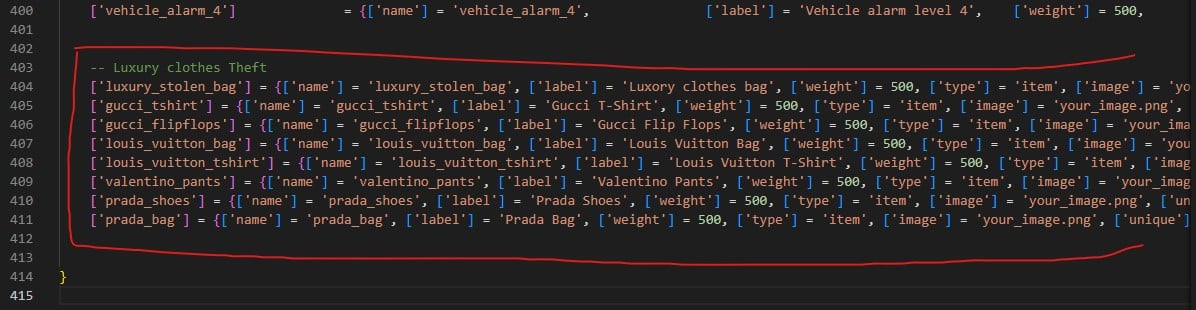 ¡Ya está todo listo! Disfruta del script 😁
## Verificación
\[TODO: INFORMATION NEEDED] Todavía no hay documentada una comprobación en el juego para verificar una instalación exitosa de Luxury Clothes Theft.
This documentation is built and hosted on [Mintlify](https://mintlify.com), a developer documentation platform.
¡Ya está todo listo! Disfruta del script 😁
## Verificación
\[TODO: INFORMATION NEEDED] Todavía no hay documentada una comprobación en el juego para verificar una instalación exitosa de Luxury Clothes Theft.
This documentation is built and hosted on [Mintlify](https://mintlify.com), a developer documentation platform.