> ## Documentation Index
> Fetch the complete documentation index at: https://docs.jaksam-scripts.com/llms.txt
> Use this file to discover all available pages before exploring further.
# Acciones de Contexto
> Agrega botones personalizados de clic derecho a los ítems, ya sea individualmente o por tipo de ítem
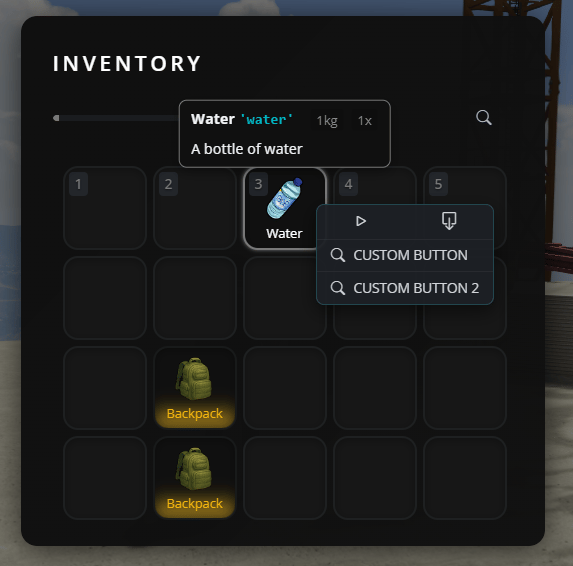
Las acciones de contexto son botones personalizados que aparecen al hacer clic derecho en un ítem de tu inventario. Permiten que los jugadores realicen acciones específicas sobre los ítems, como usar, inspeccionar, o cualquier comportamiento personalizado que quieras.
 ## Cuándo usar cada método
Úsalo cuando quieras botones para UN ítem específico (p. ej., solo en el ítem "water")
Úsalo cuando quieras los mismos botones en TODOS los ítems del mismo tipo (p. ej., todas las armas, todos los contenedores)
## Método 1: Agregar botones a un ítem individual
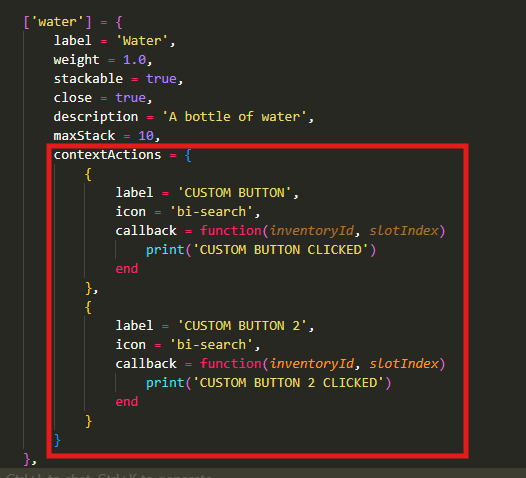
Para agregar botones personalizados a un único ítem específico, abre `jaksam_inventory/_data/items.lua` y busca o crea tu ítem. Agrega la propiedad `contextActions`:
```lua theme={null}
['water'] = {
label = 'Water',
weight = 1.0,
stackable = true,
close = true,
description = 'A bottle of water',
maxStack = 10,
contextActions = {
{
label = 'Drink', -- Texto del botón que ven los jugadores
icon = 'bi-droplet', -- Icono (Bootstrap Icons)
callback = function(inventoryId, slotIndex)
-- Tu código aquí - esto se ejecuta cuando se hace clic en el botón
TriggerServerEvent('myserver:drinkWater', inventoryId, slotIndex)
end
},
{
label = 'Check expiration',
icon = 'bi-calendar-check',
callback = function(inventoryId, slotIndex)
print('Checking expiration date...')
-- Agrega tu lógica aquí
end
}
}
},
```
**Notas importantes:**
* `inventoryId`: Identifica en qué inventario se encuentra el ítem (inventario de jugador, maletero de vehículo, etc.)
* `slotIndex`: El número de slot donde se encuentra el ítem
* `icon`: Usa Bootstrap Icons (busca "bootstrap icons" en internet para encontrar los nombres de los iconos)
## Método 2: Agregar botones a todos los ítems de un tipo específico
Si quieres que los mismos botones aparezcan en TODOS los ítems del mismo tipo (como todas las armas, todos los ítems de comida, etc.), usa el sistema de valores predeterminados.
Abre `jaksam_inventory/_data/defaults.lua` y agrega o modifica el tipo que quieras:
```lua theme={null}
Script.defaultsByType = {
['weapon'] = {
displayFields = {
-- ... campos de visualización existentes ...
},
contextActions = {
{
label = 'Empty ammo',
icon = 'bi-asterisk',
callback = function(inventoryId, slotIndex)
TriggerServerEvent(Utils.eventsPrefix .. ":emptyAmmo", inventoryId, slotIndex)
end
},
{
label = 'View components',
icon = 'bi-eye',
callback = function(inventoryId, slotIndex)
Script.closeInventoryUI()
Script.viewComponents(inventoryId, slotIndex)
end
}
}
},
['food'] = {
contextActions = {
{
label = 'Eat',
icon = 'bi-egg-fried',
callback = function(inventoryId, slotIndex)
TriggerServerEvent('myserver:eatFood', inventoryId, slotIndex)
end
}
}
},
}
```
Esto significa que:
* TODOS los ítems con `type = 'weapon'` tendrán los botones "Empty ammo" y "View components"
* TODOS los ítems con `type = 'food'` tendrán un botón "Eat"
## Agregar botones globales a TODOS los ítems
También puedes agregar botones que aparezcan en TODOS los ítems del juego usando la clave especial `['*']`:
```lua theme={null}
Script.defaultsByType = {
['*'] = {
contextActions = {
{
label = 'Inspect',
icon = 'bi-search',
callback = function(inventoryId, slotIndex)
print('Inspecting item...')
-- Tu código aquí
end
}
}
},
}
```
This documentation is built and hosted on [Mintlify](https://mintlify.com), a developer documentation platform.
## Cuándo usar cada método
Úsalo cuando quieras botones para UN ítem específico (p. ej., solo en el ítem "water")
Úsalo cuando quieras los mismos botones en TODOS los ítems del mismo tipo (p. ej., todas las armas, todos los contenedores)
## Método 1: Agregar botones a un ítem individual
Para agregar botones personalizados a un único ítem específico, abre `jaksam_inventory/_data/items.lua` y busca o crea tu ítem. Agrega la propiedad `contextActions`:
```lua theme={null}
['water'] = {
label = 'Water',
weight = 1.0,
stackable = true,
close = true,
description = 'A bottle of water',
maxStack = 10,
contextActions = {
{
label = 'Drink', -- Texto del botón que ven los jugadores
icon = 'bi-droplet', -- Icono (Bootstrap Icons)
callback = function(inventoryId, slotIndex)
-- Tu código aquí - esto se ejecuta cuando se hace clic en el botón
TriggerServerEvent('myserver:drinkWater', inventoryId, slotIndex)
end
},
{
label = 'Check expiration',
icon = 'bi-calendar-check',
callback = function(inventoryId, slotIndex)
print('Checking expiration date...')
-- Agrega tu lógica aquí
end
}
}
},
```
**Notas importantes:**
* `inventoryId`: Identifica en qué inventario se encuentra el ítem (inventario de jugador, maletero de vehículo, etc.)
* `slotIndex`: El número de slot donde se encuentra el ítem
* `icon`: Usa Bootstrap Icons (busca "bootstrap icons" en internet para encontrar los nombres de los iconos)
## Método 2: Agregar botones a todos los ítems de un tipo específico
Si quieres que los mismos botones aparezcan en TODOS los ítems del mismo tipo (como todas las armas, todos los ítems de comida, etc.), usa el sistema de valores predeterminados.
Abre `jaksam_inventory/_data/defaults.lua` y agrega o modifica el tipo que quieras:
```lua theme={null}
Script.defaultsByType = {
['weapon'] = {
displayFields = {
-- ... campos de visualización existentes ...
},
contextActions = {
{
label = 'Empty ammo',
icon = 'bi-asterisk',
callback = function(inventoryId, slotIndex)
TriggerServerEvent(Utils.eventsPrefix .. ":emptyAmmo", inventoryId, slotIndex)
end
},
{
label = 'View components',
icon = 'bi-eye',
callback = function(inventoryId, slotIndex)
Script.closeInventoryUI()
Script.viewComponents(inventoryId, slotIndex)
end
}
}
},
['food'] = {
contextActions = {
{
label = 'Eat',
icon = 'bi-egg-fried',
callback = function(inventoryId, slotIndex)
TriggerServerEvent('myserver:eatFood', inventoryId, slotIndex)
end
}
}
},
}
```
Esto significa que:
* TODOS los ítems con `type = 'weapon'` tendrán los botones "Empty ammo" y "View components"
* TODOS los ítems con `type = 'food'` tendrán un botón "Eat"
## Agregar botones globales a TODOS los ítems
También puedes agregar botones que aparezcan en TODOS los ítems del juego usando la clave especial `['*']`:
```lua theme={null}
Script.defaultsByType = {
['*'] = {
contextActions = {
{
label = 'Inspect',
icon = 'bi-search',
callback = function(inventoryId, slotIndex)
print('Inspecting item...')
-- Tu código aquí
end
}
}
},
}
```
This documentation is built and hosted on [Mintlify](https://mintlify.com), a developer documentation platform.