> ## Documentation Index
> Fetch the complete documentation index at: https://docs.jaksam-scripts.com/llms.txt
> Use this file to discover all available pages before exploring further.
# Installation
> Installiere Robberies Creator mit ESX, QBCore oder OX Inventory auf deinem FiveM-Server, inklusive optionaler Minigame-Scripts und Standard-Item-Einrichtung.
Die Installation des Scripts ist sehr einfach.
## Voraussetzungen
* **ESX**, **QBCore** oder **OX Inventory**
* Das [Cracking-Safe-Script](https://github.com/VHall1/pd-safe) von [VHall1](https://github.com/VHall1)
* Das [Lockpicking-Script](https://github.com/baguscodestudio/lockpick) von [baguscodestudio](https://github.com/baguscodestudio/lockpick)
* Optionale Minigame-Scripts (siehe unten), falls du sie nutzen willst
Verwende **KEIN** FileZilla, um die Dateien hochzuladen, sonst funktioniert das Script **NICHT**.
Verwende stattdessen [WinSCP](https://winscp.net/eng/download.php).
Lade das Script herunter und entpacke es in deine Resources.
Füge das Script zu deinem Autostart hinzu (Beispiel: `server.cfg`).
Das Script richtet die Datenbank **automatisch** ein. Falls das nicht klappt, kannst du die Dateien im Ordner `robberies_creator/sql/` manuell ausführen.
Lade das [Cracking-Safe-Script](https://github.com/VHall1/pd-safe) herunter und starte es *(Credits an [VHall1](https://github.com/VHall1))*.
Lade das [Lockpicking-Script](https://github.com/baguscodestudio/lockpick) herunter und starte es *(Credits an [baguscodestudio](https://github.com/baguscodestudio/lockpick))*.
* Lade das [Datacrack-Minigame-Script](https://github.com/utkuali/datacrack) herunter und starte es *(Credits an [utkuali](https://github.com/utkuali))*
* Lade das [Fingerprint-Minigame-Script](https://github.com/utkuali/Finger-Print-Hacking-Game) herunter und starte es *(Credits an [utkuali](https://github.com/utkuali))*
* Lade das [Memory-Minigame-Script](https://github.com/ultrahacx/ultra-keypackhack) herunter und starte es *(Credits an [ultrahacx](https://github.com/ultrahacx))*
### Items hinzufügen — Optional
Um die vorgefertigten Items hinzuzufügen, führe einfach die Datei `robberies_creator/sql/items_limit.sql` **oder** `robberies_creator/sql/items_weight.sql` aus, je nachdem ob dein Server Limit- oder Gewichtsbasis nutzt.
Die neueste ESX-Version nutzt **Gewicht**.
Falls es nicht funktioniert, stelle sicher, dass du die neueste offizielle ESX-Version mit den benötigten Abhängigkeiten verwendest.
Lade das Script herunter und entpacke es in deine Resources.
Füge das Script zu deinem Autostart hinzu (Beispiel: `server.cfg`).
Das Script richtet die Datenbank **automatisch** ein. Falls das nicht klappt, kannst du die Dateien im Ordner `robberies_creator/sql/` manuell ausführen.
Lade das [Cracking-Safe-Script](https://github.com/VHall1/pd-safe) herunter und starte es *(Credits an [VHall1](https://github.com/VHall1))*.
Lade das [Lockpicking-Script](https://github.com/baguscodestudio/lockpick) herunter und starte es *(Credits an [baguscodestudio](https://github.com/baguscodestudio/lockpick))*.
* Lade das [Datacrack-Minigame-Script](https://github.com/utkuali/datacrack) herunter und starte es *(Credits an [utkuali](https://github.com/utkuali))*
* Lade das [Fingerprint-Minigame-Script](https://github.com/utkuali/Finger-Print-Hacking-Game) herunter und starte es *(Credits an [utkuali](https://github.com/utkuali))*
* Lade das [Memory-Minigame-Script](https://github.com/ultrahacx/ultra-keypackhack) herunter und starte es *(Credits an [ultrahacx](https://github.com/ultrahacx))*
### Items hinzufügen — Optional
Um die neuen Items hinzuzufügen, bearbeite die Datei `qb-core/shared/items.lua` und füge folgenden Code am Ende der Tabelle hinzu:
```lua theme={null}
-- Robberies Creator Items
['hacking_computer'] = {['name'] = 'hacking_computer', ['label'] = 'Hacking computer', ['weight'] = 500, ['type'] = 'item', ['image'] = 'your_image.png', ['unique'] = false, ['useable'] = true, ['shouldClose'] = true, ['combinable'] = nil, ['description'] = 'Computer to hack panels'},
['thermal_charge'] = {['name'] = 'thermal_charge', ['label'] = 'Thermal charge', ['weight'] = 500, ['type'] = 'item', ['image'] = 'your_image.png', ['unique'] = false, ['useable'] = true, ['shouldClose'] = true, ['combinable'] = nil, ['description'] = 'Use to melt some doors'},
['gas_mask'] = {['name'] = 'gas_mask', ['label'] = 'Gas mask', ['weight'] = 500, ['type'] = 'item', ['image'] = 'your_image.png', ['unique'] = false, ['useable'] = true, ['shouldClose'] = true, ['combinable'] = nil, ['description'] = 'Protects from lethal gas'},
['drill'] = {['name'] = 'drill', ['label'] = 'Drill', ['weight'] = 500, ['type'] = 'item', ['image'] = 'your_image.png', ['unique'] = false, ['useable'] = true, ['shouldClose'] = true, ['combinable'] = nil, ['description'] = 'Can be used to open trucks doors'},
['gold_ingot'] = {['name'] = 'gold_ingot', ['label'] = 'Gold ingot', ['weight'] = 500, ['type'] = 'item', ['image'] = 'your_image.png', ['unique'] = false, ['useable'] = true, ['shouldClose'] = true, ['combinable'] = nil, ['description'] = 'Goooold'},
['diamonds_box'] = {['name'] = 'diamonds_box', ['label'] = 'Diamond box', ['weight'] = 500, ['type'] = 'item', ['image'] = 'your_image.png', ['unique'] = false, ['useable'] = true, ['shouldClose'] = true, ['combinable'] = nil, ['description'] = 'Diamooonds'},
['lockpick'] = {['name'] = 'lockpick', ['label'] = 'Lockpick', ['weight'] = 500, ['type'] = 'item', ['image'] = 'your_image.png', ['unique'] = false, ['useable'] = true, ['shouldClose'] = true, ['combinable'] = nil, ['description'] = 'Used to lockpick doors'},
['painting'] = {['name'] = 'painting', ['label'] = 'Painting', ['weight'] = 500, ['type'] = 'item', ['image'] = 'your_image.png', ['unique'] = false, ['useable'] = true, ['shouldClose'] = true, ['combinable'] = nil, ['description'] = 'Expensive painting'},
```
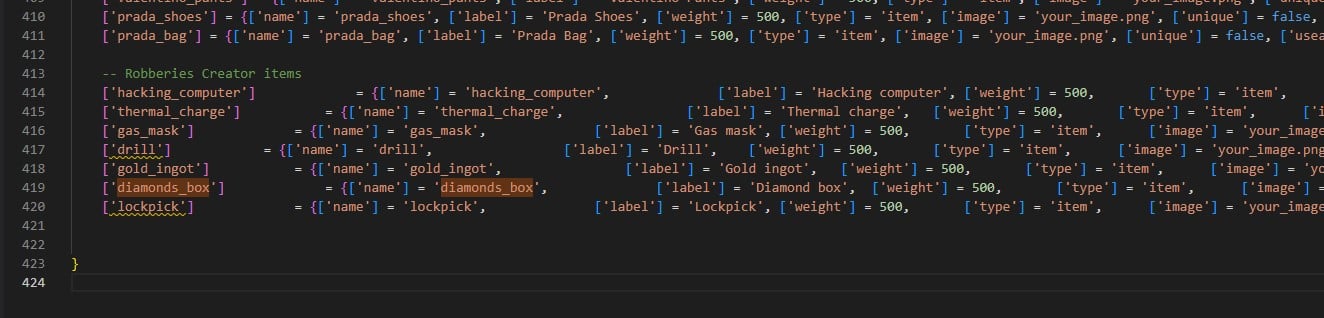 Hier ist eine Item-Liste für OX Inventory. Du kannst sie auch mit jaksam's Inventory nutzen, über die Einstellung "import from code".
```lua theme={null}
['hacking_computer'] = {
label = 'Hacking computer',
weight = 500,
stack = true,
close = true,
description = 'Computer to hack panels'
},
['thermal_charge'] = {
label = 'Thermal charge',
weight = 500,
stack = true,
close = true,
description = 'Use to melt some doors'
},
['gas_mask'] = {
label = 'Gas mask',
weight = 500,
stack = true,
close = true,
description = 'Protects from lethal gas'
},
['drill'] = {
label = 'Drill',
weight = 500,
stack = true,
close = true,
description = 'Can be used to open trucks doors'
},
['gold_ingot'] = {
label = 'Gold ingot',
weight = 500,
stack = true,
close = true,
description = 'Goooold'
},
['diamonds_box'] = {
label = 'Diamond box',
weight = 500,
stack = true,
close = true,
description = 'Diamooonds'
},
['lockpick'] = {
label = 'Lockpick',
weight = 500,
stack = true,
close = true,
description = 'Used to lockpick doors'
},
['painting'] = {
label = 'Painting',
weight = 500,
stack = true,
close = true,
description = 'Expensive painting'
},
```
Du bist startklar! Viel Spaß mit dem Script 😁
## Verifizierung
Öffne `/robberiescreator` im Spiel. Falls sich das Menü öffnet, läuft das Script korrekt.
## Optionaler Schritt
Nachdem die Datenbank korrekt eingerichtet wurde, kannst du die Dateien im Ordner `robberies_creator/sql/` löschen, damit das Script nicht bei jedem Start erneut versucht, die Datenbank einzurichten.
## Related topics
- [Installation](/de/jaksam-inventory/installation.md)
Hier ist eine Item-Liste für OX Inventory. Du kannst sie auch mit jaksam's Inventory nutzen, über die Einstellung "import from code".
```lua theme={null}
['hacking_computer'] = {
label = 'Hacking computer',
weight = 500,
stack = true,
close = true,
description = 'Computer to hack panels'
},
['thermal_charge'] = {
label = 'Thermal charge',
weight = 500,
stack = true,
close = true,
description = 'Use to melt some doors'
},
['gas_mask'] = {
label = 'Gas mask',
weight = 500,
stack = true,
close = true,
description = 'Protects from lethal gas'
},
['drill'] = {
label = 'Drill',
weight = 500,
stack = true,
close = true,
description = 'Can be used to open trucks doors'
},
['gold_ingot'] = {
label = 'Gold ingot',
weight = 500,
stack = true,
close = true,
description = 'Goooold'
},
['diamonds_box'] = {
label = 'Diamond box',
weight = 500,
stack = true,
close = true,
description = 'Diamooonds'
},
['lockpick'] = {
label = 'Lockpick',
weight = 500,
stack = true,
close = true,
description = 'Used to lockpick doors'
},
['painting'] = {
label = 'Painting',
weight = 500,
stack = true,
close = true,
description = 'Expensive painting'
},
```
Du bist startklar! Viel Spaß mit dem Script 😁
## Verifizierung
Öffne `/robberiescreator` im Spiel. Falls sich das Menü öffnet, läuft das Script korrekt.
## Optionaler Schritt
Nachdem die Datenbank korrekt eingerichtet wurde, kannst du die Dateien im Ordner `robberies_creator/sql/` löschen, damit das Script nicht bei jedem Start erneut versucht, die Datenbank einzurichten.
## Related topics
- [Installation](/de/jaksam-inventory/installation.md)